> Instead, you have to manually build playlists inside of itunes while "importing" your music (and storing two copies of it) and then transfer those playlists (one by one) to the idevice and ... it's just insane.
This is not completely true. You can store your iTunes collection wherever you like, organized however you like. You don't have to duplicate anything, although it's true that the default is for it to "import" it.
You can also create an "all my music" playlist which you can sync with the iDevice.
I used to have this setup with my music collection on Google Drive (because it didn't fit on my MBP's internal drive) and synced some of it to my iPhone. It worked well enough. The issue was more that all the music couldn't fit on the phone, so I had to pick and choose anyway.
The real gotcha is that iTunes didn't support flac, so I had to convert everything to m4a.
"You can also create an "all my music" playlist which you can sync with the iDevice."
Yes, but then how do you deal with that enormous "all my music" playlist once it is in the iDevice ?
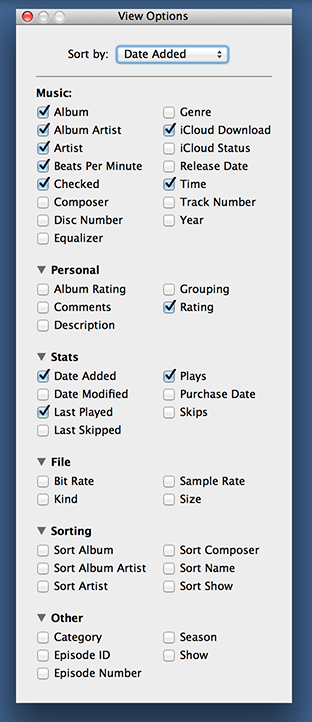
You can't browse by directory. You can't organize or display based on filename. So I guess I could parse all of the collection and transpose the artist/title/album out of the filename into mp3 metadata and then I would have a ... 30,000 track playlist ?
Again, all of this makes perfect sense if you're impulse buying a track here and a track there and if there is some way to move that "collection" to a new device every 2-3 years.
Well, I don't know how you organize your music "by directory", so maybe you can't reproduce what you do.
In my case, I organize it by artist / album / track number - track title; or by compilations. I then search for the album or the artist. I never have just random single tracks, so a directory is an album, which I have in Apple Music.
But I guess that you can't have any kind of organization you want, which is something that folders could give you.
> So I guess I could parse all of the collection and transpose the artist/title/album out of the filename into mp3 metadata and then I would have a ... 30,000 track playlist ?
Well, in the case of a meticulously managed collection, I'd expect the files to have correct metadata. Again, if this isn't the case, and you rely on file name / location, yeah, you're gonna have a bad time.
Just for the record, I've never bought any track off iTunes. All my music is ripped from CDs.
"Well, in the case of a meticulously managed collection, I'd expect the files to have correct metadata."
WAV files don't have metadata like mp3 files (typically) do.
I'm not saying I copy the uncompressed wav collection to my phone (~700 GB) but I am saying that my original metadata schema has all of the metadata in the filename:
Last, First - AlbumName - 01 - SongName - 3m25s.mp3
... and yes I could parse and reencode all of these populating their mp3 tags with these fields but, man ... what a load of work just because iTunes can sort by 50 different attributes just not filename:
> WAV files don't have metadata like mp3 files (typically) do.
I feel it's my civic duty here to repeat: they do, in fact they even support ID3 tags, but it's up to the software developer as to whether they support them or not.
WAV tagging has grown in support in the past few years, but yeah, iTunes certainly doesn't support them.


This is not completely true. You can store your iTunes collection wherever you like, organized however you like. You don't have to duplicate anything, although it's true that the default is for it to "import" it.
You can also create an "all my music" playlist which you can sync with the iDevice.
I used to have this setup with my music collection on Google Drive (because it didn't fit on my MBP's internal drive) and synced some of it to my iPhone. It worked well enough. The issue was more that all the music couldn't fit on the phone, so I had to pick and choose anyway.
The real gotcha is that iTunes didn't support flac, so I had to convert everything to m4a.