This is a nice idea. But it appears the trend of "Look at this astonishing youth!", then in paragraph 8, "whose parents own a recycling company near Shenzen...and connected him with manufacturers" so this is a joint venture between his parents company and some of their friends to back their son's business idea. Very newsworthy.
What’s more impressive: That a sixteen year old came up with a novel and useful idea, or that a seventy year old did?
What if the teenager was born to a rich family with supporting parents which were themselves geniuses in the field and nurtured his learning since he was five, while the senior lived in poverty in an isolated village and didn’t even know the subject matter existed until a year prior? Suddenly the sixteen year old isn’t that impressive.
This focus on the age of the person who did something is utterly boring. Especially since more often than not it doesn’t lead to anything. Go to any of these “teen does X” stories from years ago and try to figure out what it lead to. If you can even find any information on it, chances are it turns out what they came up wasn’t practical for some reason. Which is fine, just stop with the age worshipping.
Not sure how relevant that is. Anyone who does anything impressive will always be dependent on their support network.
It is unfortunate that the most driven, intelligent person won't accomplish much if they don't have the network. But I don't see why that diminishes this person's accomplishments.
There are plenty of people with resources that do nothing with their lives, all the way to ultra high net worth trust funders, so celebrate that they applied themselves
If you have nothing, then you need to get a job and it doesn't matter what your drive or intelligence commands, nobody is going to back you. These stories of epiphanies dont apply to you
I personally would like to see a resurgence and expansion of Reflective LCD screens, and this seems sort of similar. I mostly associate Reflective LCD screens with Gameboys.
Remember how helpful it was to go outside to see the Gameboy screen? There was a reflective material on the back side of the screen, which "lit" up the screen. As an aside, there was even a cool Gameboy Advance game with a solar sensor that encouraged the player to go outside to charge up the protagonist's "solar gun": https://en.wikipedia.org/wiki/Boktai:_The_Sun_Is_in_Your_Han.... Even the GBA SP, which had a light you could turn on and off, lit the screen up from the front.
I'm definitely not an expert in the area. My impression is that after the Gameboy, there wasn't much demand for these types of screen. I also suspect something about them doesn't scale to larger sizes as cost effectively as other screens, and there's been little interest from corporations in improving the technology :(
Reflective LCD monitors exist: https://www.sunvisiondisplay.com/
However, resolution is relatively low (FHD at 32”), contrast is quite low (25:1), as is color gamut (15% of NTSC). Still, some may prefer them over emissive displays.
They're still used in fitness watches: IIRC most of Garmin's current line has transflective displays.
They fill a somewhat unusual niche: if you're willing to sacrifice display resolution, most of your color space, and pay more money, you can gain incredible visibility in direct sunlight and great battery life (by not having to use the backlight as much).
It makes perfect sense for a watch or a Gameboy, but it's a tough sell for a laptop or tablet where most of the use is indoors.
That said, the moment someone tries to crowdfund a laptop with a reflective display, I'll be the first backer.
> I personally would like to see a resurgence and expansion of Reflective LCD screens, and this seems sort of similar.
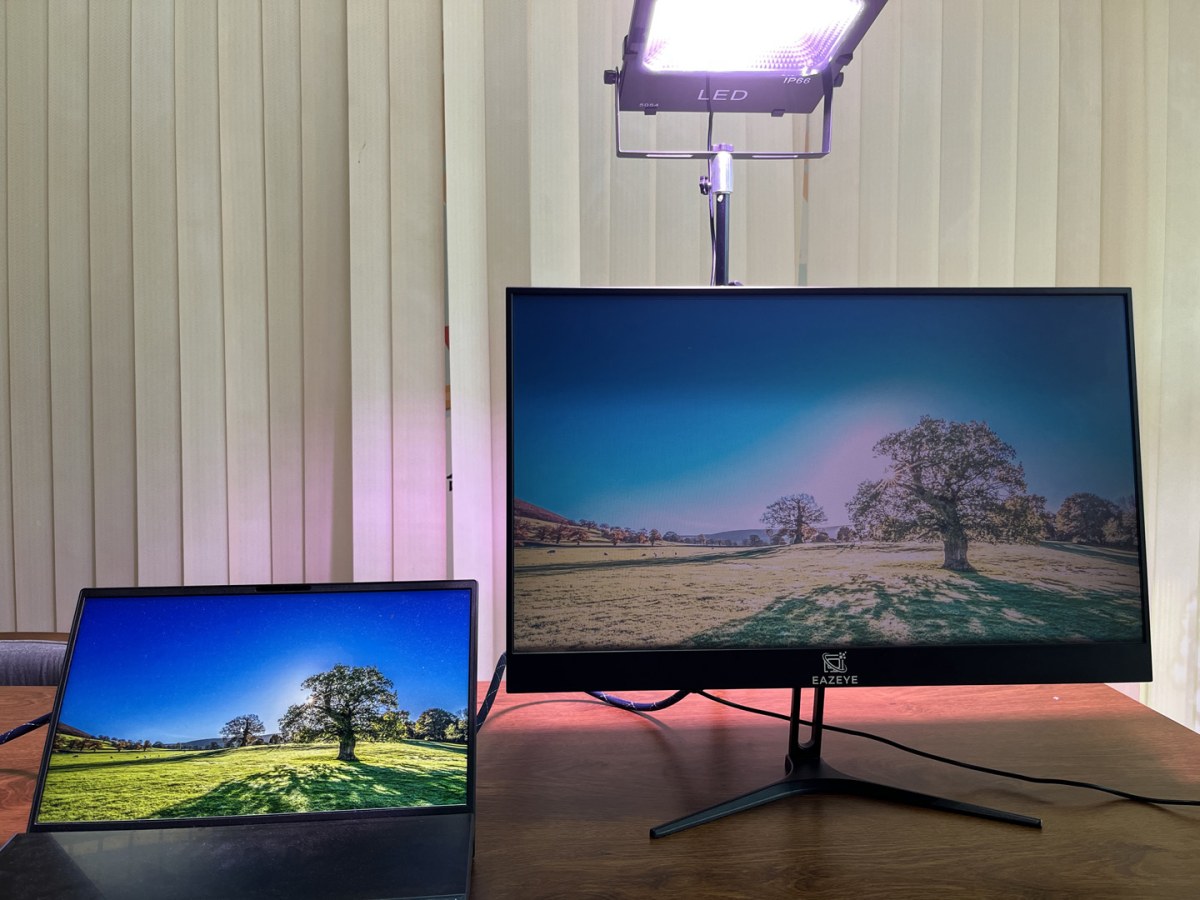
However, this monitor is not at all a reflective LCD screen. It's just a normal emissive LCD, but which for some reason uses a Rube Goldberg machine as the backlight.
I disagree with other commentators here arguing that there's no benefit this monitor would bring over simply reducing screen brightness. But I also think the claim made by the article here is at best, miscommunicated: that the bounced light improves the monitor light quality itself. On this point, I think the criticism from HN is correct, there wouldn't be a meaningful difference between equivalent bounced light, and light from the monitor. There might be a possible benefit from the lack of light flickering from AC-driven electric lights, but that is only true if the space is daylit.
However, I think there is a quantifiable benefit from making the monitor light directly dependent on environmental light, which forces our perception to adjust to a more, low contrast, diffuse environmental context.
Part of the problem is that "brightness" in the context of monitors is different from how "brightness" is used in science of light, where it is defined as the subjective perception of light that changes relative to differences in light levels[1]. So you can see your way to the washroom in the middle of the night with no lights, but can't see your way back after you turned on the washroom light, because your subjective perception of light (brightness) has changed, even though objectively the amount of visible light (illuminance) has not changed.
Therefore, having a screen lit by the environment, would shift your perception of light to better see duller, low-light conditions, which is better for our eyes, since more uniform, diffuse light causes less strain than strong, directed light.
> There might be a possible benefit from the lack of light flickering from AC-driven electric lights, but that is only true if the space is daylit.
The change isn't from AC-driven lighting to non-AC-driven lighting. It's the other way around. I'm seeing a regular AC-driven lightbulb above the screen. Monitor backlights are DC-driven.
Thanks for the correction, my understanding of electricity is shaky, and I was assuming everything connected to a wall outlet is AC-driven, unless there's a boxy inverter along the cord like a laptop, but you're correct, that's not neccessarily correct and monitors are DC-driven.
Not to crap on an inventive kid, but I don't get this.
A normal LCD screen works by shooting a backlight (usually LEDs) through an LCD panel. All this project does is replace the backlight with either a reflective backlight, or ambient light if it's bright enough.
So how could this be any improvement beyond just turning down the brightness on a plain old LCD screen?
There is no improvement. There are a lot of negatives though.
For starters:
* transmissivity of an LCD panel is pretty bad (10%-25% transmissivity?). So this is always going to be extremely dim, unless you stick a really bright lamp right up close to it. Thus, this isn't "matching" ambient light in any way.
* Brightness uniformity is going to be terrible unless you use a photography softbox lamp.
* Color accuracy is going to be terrible. Monitors use LEDs that are extremely cold / blue (~6500K if I remember) to get good color reproduction over the entire range of possible colors. Unless you want your house to look like an operating room you probably won't use a lamp that comes close to reproducing that.
This is a solved problem in cellphones. Put a $0.25 ALS in the front bezel, enable DDC/CI, and call it a day.
Here's a product idea that actually solves the issue: make a little USB dongle that has an ALS in it, make it in a formfactor that allows you to clip it to the top of any monitor, and use that to control the brightness. For DDC/CI monitors, you can directly control the backlight, and for other monitors you can just fake it by reducing the brightness of the image.
I actually did this exact thing, 20 years ago, with a monitor that had a dead backlight. I took it apart and tried angling a mirror with a diffuser on it (similar to what's shown), but ended up using white paper on the back, and a light/window behind, normal backlight style.
Why? Because, all your points are correct (although the lack of uniformity was pretty ok/analog). And, as the images in the article show, you can't get reasonable brightness without a high powered light behind it. Oddly enough, the images in the article, with the light above and a poor angled reflector in the back, show maximum possible blinding glare, with the bulb shining right in your face.
It was temporary, fairly terrible, experience. A high quality monitor, with auto brightness and ambient color matching (like anything from Apple) would be my preference (and current use).
The day before the 2005 robo games in san francisco my laptop's backlight went out. In order to operate my robot I had to disassemble the screen and use a flashlight to light it up!
I remember back when Apple's MacBooks had an actual window on the back (the glowing apple logo) that exposed the backlight. You could shine a phone flashlight through it and have it light up the LCD even when the backlight was off. Epicness.
This. Apple really, really, really cares about color accuracy. The only reason the glowing apple logo was allowed is because it takes a very, very bright direct light to affect the screen at all.
BTW, the reason this was ditched on the newer MacBooks is because they wouldn't have been able to fit a diffuser capable of preventing an apple-shaped sun spot from appearing on the display outside.
6500K is not really “extremely” blue, it approximates the color temperature of midday daylight. Most color specifications including Rec. 709 (basically sRGB) specify this color temperature through the D65 white point [1], so to display colors reliably close to spec you actually need this specific temperature/spectrum.
It’s certainly cooler than most indoor lighting, but 6500K bulbs in stores are as common as warmer ones (IME). Variable-temperature bulbs work well enough to output it too, and I would actually recommend using them to get a good matching daylight white when indoors during midday, while still being able to have warmer colors in the evening or at night (just as night color modes do for your monitor).
Color temperature of the backlight LEDs have nothing to do with width of the gamut of the monitor. What matters is how narrow are spectral peaks of the primaries. You can easily have 4500K monitor with 110% coverage of Adobe RGB, for example.
I don't even remember what DDC/CI stands for but I know what it is.
It's a protocol/system for adjusting your monitor's settings via software instead of using the on screen display (OSD) and the little buttons on the edge of your screen.
From memory it's something like Device Data Channel / Control Interface.
It's a very simple and I2C protocol for controlling devices (monitors normally but not always). Two of the wires in HDMI are literally just an I2C bus.
You can control things like brightness, switch inputs, turn the screen on/off, etc.
Unfortunately it's ancient, incredibly badly documented, and rarely implemented well by monitors.
A previous Dell monitor I had flickered terribly when you change the brightness (it did work though).
My current very expensive LG monitor has a bug with input switching. It clearly is meant to work because when you tell it to switch inputs it blanks the screen but then just returns to the same input.
I was intended to use that with a USB KVM switch so I didn't have to get a very expensive HDMI KVM switch. Unfortunately it doesn't work... so I got a HDMI KVM switch.
Unfortunately the switch I got ignores DDC/CI brightness commands so now my hardware brightness knob doesn't work. You can't win. :-(
Current plan is to implement a MitM DDC/CI device that inserts sneaky commands. Unfortunately DDC/CI is also the channel used for HDCP. It sends a message every two seconds and there's a required response latency, which means it's a bit tricky to avoid interfering with it.
I don't know what it's like in China, but in USA this would be a "college application project" to get him into Harvard and then close down the nonstarter company.
It automatically adjusts to ambient light, which isn't common on desktop monitors afaik. I wonder if one could just replace the backlight by a mirror though.
I think it would make sense if screens detected ambient light and adjusted brightness to match (like smart phones do....) so this is just a clever way to do just that with low tech. But a high price. So yeah, I think it might just be better to take the existing technology in smart phones and apply it to laptop and desktop screens.
One of the things I really hate about reviews of laptops, screens, etc, is the focus on how bright the screens are as though it's a good thing.
Who really wants to be staring at 1,600 nits of brightness all day? Certainly not me.
A much better screen, in my opinion, would have super high contrast with low brightness. Yet, this isn't something that gets measured by reviewers. Coincidentally, that's also why I like using OLED screens. At least with true black, much of the light can get turned off completely.
Most mainstream computer monitors, designed for use indoors, are not going to be anywhere near 1600 nits. The monitor I bought last year for $400 tops out at 400 nits.
Laptops, phones, and smart watches are designed to be used in varying conditions like outdoors, where the sun can easily overpower a 400 nit monitor. Also in low light conditions, which is why they mostly have ambient light sensors.
There's always some user out there who wants to watch HDR videos in the middle of the Sahara desert at solar noon, which would actually be an interesting use case for the monitor in the article.
What? That's like complaining your car reviews talk about how it has 300hp, why would you be at full throttle every time you drive? High brightness is a good thing because it's used for HDR, areas where there is a lot of sunlight, etc. Something OLED struggles with as well. My wifes laptop with OLED only does like 600 nits.
We talk a lot about peak brightness, which is useful in some scenarios like you mentioned.
But you know whats more interesting?
Brightness stepping, min brightness and ambient light sensors; which are never talked about by reviewers, which is then a weird cycle because manufacturers seem to care a lot about what reviewers focus on.
Help me understand. When a car has multiple trim levels, and one has more horsepower, you would want the one with fewer? Because in theory you wouldn’t use it? And this has nothing to do with MPG either because in some cars the higher power engines get better fuel economy. But based on that metric alone, you would pick the lesser model? Just like if a MacBook Pro came in either 1600nits or 400nits, you’d pick 400? Yes or no?
> one has more horsepower, you would want the one with fewer?
Not necessarily, I would choose using other factors. I argue we should rely less on rarely practical characteristics (maximum power / brigthness) and add more day-to-day aspects into reviews and search filters.
There are few qualities usually mentioned along side displays: size, technology, resolution, colour rating, contrast ratio, and max brightness. I think brightness matters less past some point and we really should focus more on traits listed by @boplicity and @dijit (there's got to be more).
Similarly with cars: I don't care about top speed as long as it goes upto the motorway limit, I don't care about engine power as long as car feels nice in real life; I pay attention to size (will it be comfortable in the city and in my tight parking lot?), fuel consumption, interior quality, luggage space, steering sensations.
> Just like if a MacBook Pro came in either 1600nits or 400nits, you’d pick 400?
Well, if the 400 nits one has an advantage (for example it has OLED, so only the letters will burn my eyes in the evenings, not the whole area of the screen) then I would pick that one.
Most LED monitors flicker at low brightness settings, but you can get ones that don't.
The ones that don't have more expensive electronics driving the backlight. Eizo's FlexScan EV series is one example.
I have a FlexScan EV, and I don't find being able to turn the brightness down to 1 or 2 nits without any flicker as useful as I thought I would. Even in complete darkness, it is hard to read the screen when the brightness is that low.
CRI tests illumination sources, not displays. I suppose you could crank the display to max white and hold it up to the test pigments; that'd tell you something about the display's filters, but I'm not sure how useful it would be.
I don't understand why more device don't have ambient light sensors built into them. Phones have been doing this amazingly for 15+ years but almost no displays do.
I think I saw a TV a while back that did, but that's 1 out of the 10 billion models out there.
My cheap Benq monitor has a ambient light sensor, and I disabled it because it sucks. It never manages to set the exact brightness I would consider right for me in every scenario.
Instead I much prefer to control it manually via the mouse scroll wheel and DDCI, that way I can adjusted exactly to my liking every moment of the day.
On phones this feature makes sense because as you walk and move around the ambient brightness shining on the screen changes rapidly but on a indoor PC monitor in a room/office, the ambient light is relatively stable because you can control it via light switches or window blinds, so manual control is fine.
My Dell laptop had one, which was very poorly done. Sitting in a dimly lit room, I would catch it self adjusting every several seconds. I ended up disabling it.
Turning brightness too low also reduces contrast (e.g. for text). There’s a middle ground with adequate ambient lighting and moderate brightness setting.
No comment on this actual product, but I found that turning the brightness as low as I can tolerate on my monitor significantly reduced my eye strain and discomfort. It takes a little getting used to, but I highly recommend giving it a try.
Switching from OLED to IPS screens that have no flicker helps a lot too.
Very hard to find an OLED monitor that doesn't have flicker (this is not refresh rate - this is brightness modulating from 0 - 100% hundreds of times a second - hard on eye muscles). Old CRT monitors were even better than current OLED displays because the flicker modulation was a curve and not a digital hard/on-off type flicker.
In 2007 I was taking apart LCD screens to do multitouch experiments. One of the things that I noticed was that without the backlight panel, you could light up the screen using ambient light and use a camera to get infrared light to reflect your fingertips for detection. A bunch of folks in the NUI space were doing this. Projectors, LCDs, front detection, back detection, capacitive touches, optical touches, etc.
The biggest issue with this approach is color balance. Imperfect light creates imperfect colors. The LCD is tuned to display colors at the light intensity of the backlight panel it uses. Without the backlight and filters, light is uneven, unbalanced, and it will show in the screen. Fine if you’re just doing text. Not fine if you’re editing video. In the end, this is not a new approach to monitors but much much worse.
Wait, so instead of a regular screen, you get an unevenly lit screen and a very bright and glary light source that’s visible right above the screen? Those sample pictures look miserable to work near.
How about a conventional display with an ambient light sensor that can adjust brightness to match the ambient conditions? Bonus points for optional automatic white point adjustment. (Many mobile devices have these features.)
If nothing else, this monitor is a good way to counteract the problems that come from working in otherwise-underlit workspaces, since it simply won't work there.
Sony released the PCG-C2GPS laptop in Nov 1999 which had a reflective LCD almost exactly like this. The use-case was that you’d primarily use it in your car (during the day) for navigation and want the better battery life by not having a backlight. The back of the LCD hinges off like this but also stores a front light you can attach for low-light situations.
What we really need is desktop monitors to have similar light following properties as tablets and phones and if that can be calibrated a bit they will follow the lighting of the room as it changes through the day. We don't need completely new monitors we just need desktop computers to copy something phones and tablets have been doing for 15 years now and all for the cost of a simple light sensor.
Desktop monitors have not made it possible to adjust their brightness from the PC and that is a big problem in all this or we would have solved this years ago.
Actually, most monitors support the DDC/CI protocol [1]. But I think implementations tend to be spotty hence Windows (for example) doesn't show a brightness slider in some configurations. Third party apps exist though (e.g., TwinkleTray [2]).
Eye strain seems like the wrong thing to focus on here. I'm much more interested in the efficiency of this design.
Most of the energy drawn by an LCD goes into its backlight. If you are trying to use one outside, then you are fighting the brightness of the sun by matching its intensity with a backlight. Why not just use the sun as a backlight instead?
Of course, this is a very simple and clunky version of that. I do wonder how much could be optimized.
The thing with eyestrain, that it is extremely different to pinpoint what it causes for people with sensitive eye, so any alternative solution would work.
The most important factor is, obviously is the backlight, and not only being PWM or DC, but also the spectrum and "texture" of the light itself: a typical LCD has diffusers which may have different construction and cause serious issues for some people. Some may be sensitive to polarisation, some people are sensitive to how grainy is antiglare coating is etc.
A good number of people (me including) cannot tolerate backlight with blue at 450 nm, the more it is towards green the better. Some cannot tolerate KSF phosphor in the wide gamut backlights (I am perfetcly fine with it), and love quantum dots.
It is a serious problem, but using the ambient light for the backlight would make experimenting the backlight a super easy task, so yeah, this monitor is a great idea.
If you really want to help with eye strain, make a monitor with some kind of pancake optics so that the screen appears to be at infinity. Having to focus at something right in front of you all day strains the focus muscles in your eyes.
Older people will know what I'm talking about here..
One thing I'm curious about... with the hinge closed, is this monitor functionally equivalent to an RLCD display (like SunVision's products or the Hisense Q5), or is there still a discrepancy in brightness versus an RLCD display in equivalent ambient light?
I appreciate this guy trying to solve his problem, but it sounds like what he really needs is blue shifter like flux or the built in systems of the OS to set the color temperature lower.
I just have flux running all day cutting the temp to 5900K. Never had eye strain after that (and slept better too because I cut down to 1900K at night (ie. very yellow).
If he has to use other people's devices all day, like school devices, he can always wear blue-blocking glasses.
It is a typical advice which is efficient but flawed. All software methods to change color temperature suffer from two problems: they kill contrast (already low for IPS), and they kill color calibration. It also cannot change the backlight spectrum in the blue area. Proper, good backlight won't strain your eyes, when run at normal 6500K temperature,as it has blue peaks shifted.
Very nice. Recently we spoke about monitors. Why don't office monitors adjust the brightness. I often just make light in the office, because it is simpler than adjust the brightness from the monitor. I know thats sick, bad, expensive, whatever solution.
It sounds like the issue is that there are too many Computers / TVs and screens in schools. For something that has no evidence its better for learning (And actually evidence its worse for learning). Perhaps schools should rethink things.
Why can't we software emulate this? We have webcams, we know roughly where light comes from and how much. We should be able to turn those sources into 3D model lights and illuminate a virtuall screen, perhaps even with onscreen objects having some texture, like raised. Button in browsers.
Better yet, how can we get just away from screens more without getting bored? I love screens but there's a limit. Gaming and online content are pretty much the ,ain leisure activities that don't involve food or alcohol (and all the health issues of overeating and drinking).
You don't need a fancy monitor to not strain your eyes. You know you need? Lower brightness or more ambient light.
This is something I've been saying for ages. Some time in the last 10 years or so, it seems we decided as a collective that screens should be SUPER BRIGHT, and now half the tech crowded uses dark mode.
If you "just like dark mode", that's fine. But if you avoid light mode because it hurts your eyes, then your brightness is too high or you don't have enough ambient light.
I sit at my computer 12-16 hours a day. Yes, I know, it's pretty unhealthy. But I have never felt eye strain. Even after getting LASIK and my eyes were a little more sensitive to light, I could stare at my screen all day after the first day.
This is definitely helpful, but it's dismissive to say that this is _all_ that it comes down to. I have to keep my monitors on their lowest brightness, and use them in well-lit rooms. Even then, I start getting strain after a couple hours depending on the type of work I'm doing.
Do you have any recommendations or links? I don't see anything on the innolux site about regular old computer monitors. I guess they manufacture the panels?
I agreed with you but a true low brightness setting while maintaining contrast is hard to dial in.
Also, due to either the driving electronics or LED diode physics sometimes the back pane initial brightness at 0br+1*dbr is too bright (lol or lumens instead of br), for instance on my macbook pro at night lights out darkness.
For instance with OLEDs there is a turn on voltage, where either the pixel is Off or On at this initial brightness. That goes sufficiently dim on my phone with an OLED screen. I suspect the back pane LEDs have this same minimum brightness at minimum voltage.
An OLED laptop or desk monitor would be nice but I don’t have that money.
Current OLED desk monitors are terrible in the eye strain department. I got one thinking it would help and it is now relegated to YouTube detail.
Nice image but it self dims after a few minutes when the image is static. Usually, I don't notice it is dimming and only when I am straining my eyes to see I remember why, shake a window and boom sudenly it is very bright (relatively). Very annoying and the only way to fix it kills the warranty.
But at least the brightness setting should be easy to reach then (preferably analog dial). In my current monitor, the only way to adjust it requires multiple tiny 4 way joystick button presses to reach the correct space in the menu. No direct controls. The only direct control is for volume, while one would never want to use this monitor for sound (super tinny hdmi speakers). No option to even assign this control to brightness.
Exactly this, you should be viewing a monitor in the same lighting environment that you would read a book or magazine. The catch is physical media forces you to address a deficiency by changing your environment, where an illuminated screen allows you to adjust the media.
Maybe I should wire the monitor controls on my computer to adjust the lights in my room..?
This crude advice, which is not always effiecient. I have sensitive eyes, and many monitors cause issues even when they are set _at_ _zero_ brightness. The both feel too dim and too bright simultaneously. Even a single white letter on a black bacground would cause bad eyestrain on a "bad" monitor. Luckily I have found models which do not cause issues and am using them.
I get eyestrain with lower brightness, but I typically don't use my computer in the dark. On the occasion that I do, I do lower the brightness. I also loathe dark mode in general, but I do enjoy a darker background with colorful fonts while programming (Dracula theme for Sublime). All in all, I rarely get eye strain with my habits.
I usually run all my screens at or below the 25% mark. I see some of my colleagues with theirs cranked up and I don't get it. maybe for doing some UI work due to colors, but man that just hurts my eyes.
i've been sitting at a computer for 40+ years. never had eye strain. although proper ergo was drilled into me at intel and microsoft, and i continue those practices. someone needs to teach the next generation of programmers about ergonomics because clearly they aren't getting it from work or school. if you're going to lock your body into a seated position for 10+ hours a day for decades, you need to do it responsibly and not just grind through if you feel pain. it only gets worse.
you are forgetting an important aspect, refresh rate and the fact that certain screens insert black frames to reduce ghosting which produce blinking effect that is not good for the eye/brain.
solarized-light plus 2700K LEDs in the room are a perfect match.
and only one monitor. having to turn your head to view a screen is bad for your neck muscles. only eyes move, not neck: keep head in a stabilized position always.
i think a lot of people prefer to sit on a couch in a dark room, and then complain their back, neck, wrists and eyes hurt and wonder why... but hey you do you.
It stirs great jealousy in me as well... but as they say, are we not all standing on the shoulders of giants? And if the new [whatever] is an improvement, does it matter if it came from a rich kid? Sorry, I'm not actually directing these questions at you, but rather myself as I try not to feel any resentment toward people who were born better off than me.
I think the point is just that more often than not, the kid is only where they are because they happen to have someone else taking care of the bigger challenges that end up being the barriers for most other would-be young innovators.
Kind of like how especially well done science fair projects or reports for very young kids are often the result of parents handling most of the intricate work or otherwise being engineers/scientists in the field themselves, thus being able to get them access to things typical kids don't have.
Eg 12 year old me could only throw together a solar powered buzzer through trial and error with electronics as I had no one who could do anything beyond resistor networks, but my kids would be able to do much more advanced things because I would be able to handle/simplify the complex stuff for them.
Another glaring example would probably be Sam-Bankman Fried. No way would any person without the connections offered by his parents have been able to get praised and handed billions of dollars by investors for playing video games while pitching to them.
> I think the point is just that more often than not, the kid is only where they are because they happen to have someone else taking care of the bigger challenges that end up being the barriers for most other would-be young innovators.
So what? If the child did nothing, nothing would have happened. He did something. It might be worthwhile. That should be celebrated.
> Eg 12 year old me could only throw together a solar powered buzzer through trial and error with electronics as I had no one who could do anything beyond resistor networks, but my kids would be able to do much more advanced things because I would be able to handle/simplify the complex stuff for them.
Which is why our emphasis on social mobility ought be at the family level. Families move socioeconomically. Individuals are just brownian motion.
> So what? If the child did nothing, nothing would have happened. He did something. It might be worthwhile. That should be celebrated.
That's the thing though. The kid could've done anything between something and approximately nothing, and you wouldn't be able to tell. It's just like with the science fairs - the especially well done projects sometimes are just 100% done by parents.
He's suggesting that the reason we find child-inventions impressive is because they're children doing it. "Rich manufacturing-savvy parents fund child's idea" is far more par-for-the-course.
I'd imagine it would be quite routine for children to "invent" things with such parents --- how many are tinkerers as children? A lot.
No. I am interested in if it is financed by investors that believes in him and the project, or his parents that might value supporting their child higher than putting money behind a good investment. In the end I don't know, I just couldn't help myself being a bit snarky cause these young entrepreneur stories always seem to come with some asterisk.
Something that drives me absolutely bonkers is how laptops, phones, tablets, all treat brightness as a first class feature. But if you want to quickly adjust brightness on your desktop monitors, it’s intensely tedious or requires you to be tech savvy and install software.
Why oh why can’t I just Fn + Fkeys to adjust brightness on the fly?!
A dim, unevenly lit panel with awful color rendering is supposed to reduce eyestrain?
This is good for winning first prize at a high school science fair. It makes no sense for any other purpose. And even at a science fair, the ability to build this is somewhat impressive but the inability to recognize it as a bad idea is not.