I see you found SizeUp. That's also my application of choice. But it doesn't look like you did a lot of research into the available choices, or at least didn't bother listing them. Here's but a handful, for others who are interested:
.... I could go on. OS X does not lack for people who disagree with Apple's idea of window management. There's lots of tools out there, if you just look for them :)
I will also add that with many of these "window managers" you get the terribly annoying behaviour of one window's shadow disturbing the content of its neighbours.
Just yesterday I found ShadowKiller[1] that removes window shadows for all OSX windows, making it feel even more like a true tiling window manager.
ShiftIt is great because it's an open source version of many of the other app suggestions you list!
The public 1.5 versions on GitHub are missing one important feature: pushing the current window to a second monitor. This is available on the 1.6 branch. I couldn't get it to build with Xcode on OS X Lion, but the author has a very stable 1.6 binary available for download:
I use Arch + Xmonad at work and I simply love it as the OP does. Sometimes I need to work from home and I don't want to keep two laptops here, so I need to use my old 2008 unibody Macbook.
Working in OSX with Vim and console is painful after the Linux experience. Installing lots of utilities might help, but I chose to install Ubuntu with Xmonad and after couple of hours I had my favorite environment ready for productive work.
I know that the support for newer Apple technologies is not so good in Linux, so when this old laptop finally dies I need to buy a new one from some other manufacturer.
I've been watching Thinkpads very closely. I used to own X40 until it broke and before 600x (which never broke, but it's kind of old now).
What model is preferable nowadays? There are not lots of shops to test them at least in Berlin. I want 13" and lightweight, but still powerful enough laptop. Lots of ram, i7 CPU and a SSD disk. The most important thing is an excellent keyboard and touchpad. I heard Lenovo is not using the old and excellent keyboard in their laptops anymore and I haven't tested the new one yet.
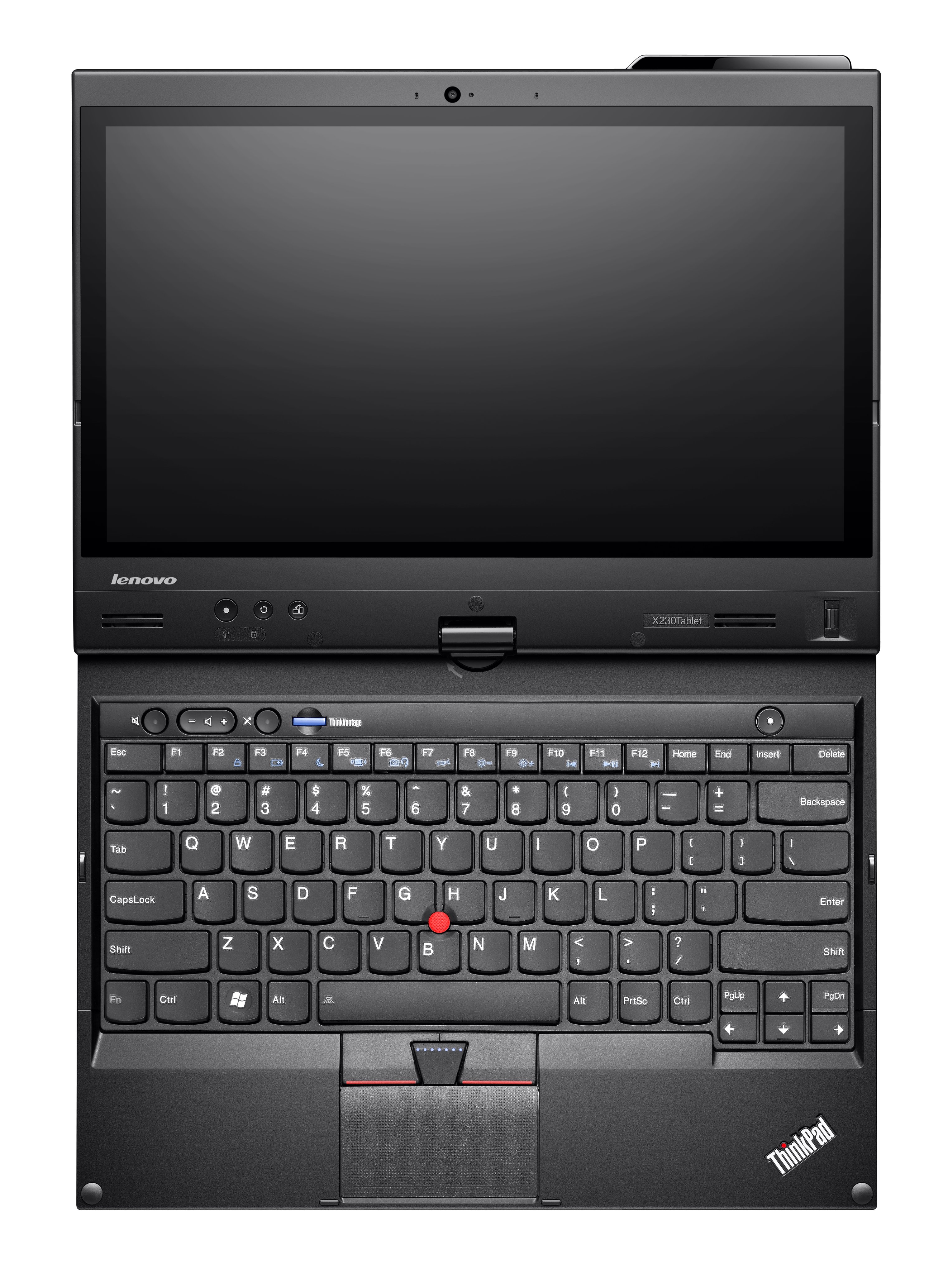
ThinkPad X1 Carbon (which is their answer to the MacBook Air - similar size to the 13", but 14" with more horizontal resolution), or the 12.5" X230, which is a bit heavier, but has 60WHr+ battery options and IPS display (both missing from the MacBook Air).
The guy doing this review was only able to get 3.5 - 4 hours out of the battery. http://www.nomobile.ru/reviews/162216.html
Mediocre horizontal screen resolution for a 14" too
1600x900 on 14" is mediocre? Bear in mind that it's exactly the same size/weight as the 13" MacBook Air but has larger display (thanks to a narrower bezel on the sides), higher resolution, and an arguably better keyboard. Shame about the battery life, though. Also, considering they're using a carbon fibre shell, they should have been able to get the weight down to considerably less than that of the Aluminium MacBook Air. Sony got that part right with their own carbon fibre VAIO Z (lighter and with better display than either), but it has worse ergonomics than either the ThinkPad or the Air.
No product out there at the moment that gets everything right. The MacBook Air probably comes closest, although the battery life and TN+ display could both be substantially improved.
Note that the ThinkPad X220/X230 has both a better, IPS, display and can run for 12+ hours using a 9-cell battery whilst still weighing less than a 13" MacBook Pro. However, it's heavier than the newer slimmer notebooks and has lower resolution:
Haven't tried it yet, but it's a risky departure from the previous long-standing design (and it applies to all of their models being released this year - i.e. the previous 7-row layout is history). They seem to be taking the redesign seriously though - some more information on their blog: http://blog.lenovo.com/design/thinkpad-x1-designing-the-ulti...
My worry is that they've moved the page/up down keys quite illogically down next to the arrow keys. It just doesn't map right mentally - moving pages up/down shouldn't have to involve clicking keys either side of the arrow keys:
Not too happy about the home/end keys for similar reasons.
Making the keys more ergonomic is fine but it seems there really was no incentive for them to change the layout to a 6-row one other than arbitrary stylistic reasons.
That all said, it's probably still the best notebook keyboard on the market. I have a MacBook here and feel/tactility of the keys is superior on my old 2010 ThinkPad (if only just - they're both great keyboards) - on the new models, layout issues asides, it's supposed to be even better.
I've had a love affair with the x200's for the last few years, x200, x220, and the x230. They are all very competent machines. I'm currently using a x200 with an SSD running linux as my primary machine.
Don't take the t series. Lenovo basically transformed this to pure trash. The only thinkpad series that lives up to ibms quality is the x series. Truthfully I wouldn't by thinkpads anymore. The only notebook you can by nowadays is the MBA.
Counter-anecdote: I have a T520 and I'm perfectly happy with it. Get the full HD screen, it's worth it. I admit that I'd prefer the old 4:3 screen size, but that's just not the way of the world anymore.
I agree that quality has declined somewhat under Lenovo, but the old T43 was a goddamn tank. I've got one hooked up to my tv for streaming - it puts out full 1080 with DVI if you get the dock. I think it was also north of $2k when new.
So, no, the current t520 is not as well engineered as those old ones, but it's still better than the vast majority of its peers. And you get some great deals on refurbs and open boxes on outlet.lenovo.com.
Current MBA is only 4gb ram. That's a deal breaker for me.
Depends. I have a X41, which gets flakey with the headphone jack when you put the laptop to sleep (requires a reboot to get it working again). Other than that, I can't remember having any issues with it.
One of the nice things about it was that the volume / brightness hotkeys were hooked into the BIOS so I could use them even when the OS was locked. I believe all ThinkPads are like this. I miss this on my current laptop.
I haven't used XMonad but I've been a heavy ion3 user for many years.
Last I checked none of the available bolt-ons (including Sizeup which the author proposes) would come anywhere near a true tiling WM.
The only candidate that would even try to automatically tile windows was TylerWM - but that was buggy as hell. All the others only act on keyboard-shortcuts, which largely defeats the purpose.
I'd happily pay $200+ for ion3 as a native OSX WM. The OSX window manager is just absurdly terrible.
A slight tangent, but dmenu-4.5 uses token matching, which allows you to search somewhat fuzzily: "foo rb" will match "foobarbaz". How it looks compared to Alfred and co. is a matter of one's aesthetic...
Tyler WM (http://www.tylerwm.com/) shows a lot of promise. It's a pretty good 1.0 but there are some edge cases that still prevent me from using it full time.
To chime in here, IMO what sets Tyler apart is that it takes control of a window as soon as it is created, whereas AFAIK all other offerings leave the windows alone until you use keyboard commands to resize them.
It is indeed promising, but like you I cannot recommend it to anyone until they have fixed several critical bugs.
Could you elaborate on what some of the bugs you ran into were? I came across it the other day and was eager to try it, but reticent to spend the $10 without a demo (currently in between jobs)
Oh, stuff like windows becoming unmanaged, Tyler becoming disabled until a restart, windows moving around without you wanting them to. It's pretty much an alpha product - don't spend yet, wait a couple months and see how it goes.
Last I tried (admittedly a few months back) it was still alpha-quality. I.e. the entire screen would get shuffled unpredictably, windows would end up misaligned (partly overlapping each other) etc. - nowhere near usable.
It depends on what mouse or touchpad you have, but I find that I don't even use Command-Tab anymore. It lacks the precision of getting to exactly the right window. Launching Mission Control via touch allows me to switch to the window I need much faster.
I hear you on the maximizing thing; I ended up finding a program called Shift (http://shift-it.en.softonic.com/mac) works very well to maximize, snap a window to just the left or right half of the screen, etc. Hope that helps!
On a MacBook, I find it pretty easy to move my hand down a couple inches to swipe between full screens, and access mission control when needed. I could see it being a problem when using a mouse, though.
Going to System -> Preferences -> Keyboard -> Keyboard Shortcuts and looking for Mission Control and Keyboard & Text Input reveal a number of shortcuts which may or may not be enabled (the same way swipe settings are 3f or 4f)
Here you will find the following shortcuts:
    Mission Control
    Application windows
    Move left a space
    Move right a space
    Switch to desktop N (number of entries up to N appearing  varies with current number N of dynamic Spaces)
Also:
Move focus to active or next window
By default and depending whether you upgraded to Lion and what your previous settings were the base mod key may be Command, Control or Command+Control. If you installed from scratch it's Control.
Then, shortcuts are:
- Ctrl+Up/Down to enter MC/App Exposé
- Ctrl+Left/Right/1/2/3/4 to change Spaces (works on the desktop and in MC)
- Command+` (and Tab/Shift+Tab) cycles apps in App Exposé.
- Arrows allow one to select a window in App Exposé
On a laptop, the touchpad is right below the keyboard and I usually trigger MC with a 3f swipe, F3 or Control+Down (depends on my zone level) and select the window with index (when swipe-triggered) or thumb (when keyboard triggered). When using a mouse, I'm using a Logitech MediaPlay at home and a Logitech MX900 at work, which have two awesomely placed thumb buttons, which map perfectly to Mission Control and App Exposé (the button choices appear in the rightmost combos in System Settings -> Mission Control if you have a sufficiently buttoned mouse). Using another mouse than Magic Mouse I lose the brilliant touch/inertia scroll, but the two-finger double-tab gesture is completely ridiculous and a total pain.
Comparatively, Command+Tab is only fine when I'm toggling between two apps which have a single window, else the whole target app windows cover the previous one, which defeats my extensive use of Window Magnet. Also I have 1) a high chance of not landing into the proper window this way, and 2) a high chance of toggling between three apps, in which case Command+Tab is inefficient. Also I find it egregious that one keeps open Command+Tab by keeping Command down, then drill down to App Exposé, where you have to release command before moving with arrows and subsequently select a window with Return when it could be Command all the way then release to exit.
Also, when moving between terminal windows and tabs I use the build-in Next Window/Tab shortcut (Command+Left/Right, with Shift for tabs). I bound the same keys in MacVim for consistency.
Besides there's still lack a (non third party) keyboard way to:
Ah. I work on a laptop, and I can't stand it when a window isn't using up the entire space, so I just make everything fullscreen and flip between them with cmd-tab (slow) or ctl-left/right (fast). I switch between ~4-5 macs a day and ~30-50 a month, so I can't be bothered to use anything but default keybindings and software.
I really love Arch, but for me the reason it's segregated to a VM is:
- power management: Linux does not hold a candle to OSX (which is able to shutdown entire components like soundcard, webcam dynamically when not in use)
- Lion's external display+lid+sleep behavior: external screen+AC power makes lid-close sleep inoperant, so I can just plug both lid closed and my laptop wakes up to be a desktop (bluetooth input devices help a lot). Conversely unplugging either makes it go to sleep, back in laptop mode.
The Linux kernel is capable of commanding individual devices to power off. Run powertop and it will show you what's using power and offer to turn it off. My experience with Thinkpads (from two or three years ago) is that running Windows gives you about 10 hours of battery life while doing essentially nothing, while running Linux gives you 8 hours. Both are so high that it doesn't really matter. My X220 has never run out of battery, and I fly a lot and don't really plug my laptop in at home, so 8 hours is apparently enough.
For your second point, just explicitly command your computer to do what you want. If you want it to go to sleep, type "acpitool -s". If you don't want it to go to sleep, don't type that.
If you like OS X, use it, but if you hate OS X and are only using it because of the two issues you list above, that's crazy :)
> The Linux kernel is capable of commanding individual devices to power off. Run powertop and it will show you what's using power and offer to turn it off
Oh I perfectly know that, the problem is that it's manual. With OSX I play a song, soundcard comes alive from its powered off state and plays sound, song stops, soundcard powers down after a little idle timeout. The same goes for the webcam, ethernet board and various other components. With Linux I have to either write some suboptimal wrappers to programs to kick devices in or out, or do it manually, or sacrifice battery life.
Comparing battery life, Linux is two~three full hours behind OSX out of seven~eight (after thorough analysis involving powertop1/2). That's a 30% drop and brings me to almost a day to a little more than half a day of work per cycle. Well, it was so a year ago, because now my battery has crossed the 600 cycle count bar so it holds an hour less. And don't start telling me "oh that was a year ago, Linux has improved on that front since then", since OSX improved in that area too (I've looked at hard data battery metrics).
> For your second point, just explicitly command your computer to do what you want. If you want it to go to sleep, type "acpitool -s". If you don't want it to go to sleep, don't type that.
You're missing the point, I perfectly know that too.
Find me a single PC that can do this:
1) asleep with lid closed, you plug in an external screen and if you're on AC power the computer wakes up and makes the external screen primary, else it does not even wake up and stays asleep.
2) awake with lid closed, AC and screen plugged in, you plug out external screen or AC power and the computer goes to sleep
3) awake with lid closed, AC and screen plugged in, you open the lid and it becomes primary while external screen becomes secondary.
4) awake with lid open, AC doesn't matter but you plug in an external screen and this one becomes secondary, retains its specific configuration including relative position, wallpapers, resolution and color calibration settings from previous times per external screen device.
I've written my own extendable acpid handler in Python to achieve various schemes, react to complex events, and take complex actions. I know exactly how to do 2, 3 and 4, and I know exactly how much hackery and time is needed to achieve this, and it's not really reliable in the end. As for 1 it might as well be downright impossible.
> My X220 has never run out of battery, and I fly a lot and don't really plug my laptop in at home, so 8 hours is apparently enough.
As I said my battery is getting past middle-aged and the more minutes, the happier. Also you can consider not only "instant" battery life (i.e time it takes to go from full to empty) but long-term battery life (time it takes before the battery is a complete brick): the longer the cycles, the less wear it takes, so the longer it lasts before going to the trash.
> If you like OS X
I do :-)
If only Lion's "full-screen" would really be a chrome-less tiling window manager I'd be completely happy. Things, like Window Magnet, fullscreen Terminal.app and tmux help a lot though.
Every computer can do this, its not a function of hardware. You'll have to write your own scripts to do it but thats just part of the Arch Linux ethos.
To wake and reconfigure displays on in your example (1), you can poll for ACPI events for on:
> Every computer can do this, its not a function of hardware.
I'm dying to know how a computer in ACPI S3† can execute my ACPI scripts. The only way for it to work is for some hardware to trigger an event that will kick it out of S3, and PCs old and new that do so on external display plug are (if any) apparently rare enough that I never encountered them, so currently I consider them devoid of this feature.
Even if it were so, this would require, as you say, and again as I did already for cases 2) 3) and 4), writing scripts, and such scripts are non-trivial. Calling xrandr (which of course needs DISPLAY and some X magic cookies) from an ACPI handler (which runs as root while the X session runs as you) requires interesting piles of trickery. Then timing issues come in, as drivers take time adjusting themselves and you have no way of knowing when they're ready (in the meantime e.g xrandr redurns/does crap). Also, interestingly enough, all sorts of fun stuff happens on VTs when the primary display vanishes to be thrown into an external one.
I long for the day when KMS supports multiple monitors and I can have VTs left and right, and I can run my favorite phrakture-like no-X setup on bare metal (and my web browser in a lightweight Wayland), but that day is far away so that setup stays in a VM.
† i.e CPU off == no power at all, only RAM and components registered for waking like USB controllers have reduced power.
When I was reading the original article, my second thought was 'why not just install Linux'. My first thought was 'call a friend who has too many computers and borrow one for a bit until you can get the thinkpad fixed'.
Now I have two further thoughts..
How does one use a data projector from an Apple laptop these days? Most projectors I come across are staunch VGA.
Is the X11 environment still available under the current MacOS? Just run Xmonad under that...
At the moment, not much - Apple's displays and some third-party external drives. There are announced plans from Sony and Asus (I think) to add it to their laptops toward the end of the year, and Intel is close to adding support to their chipsets. I'm interested to see if Apple's approach (partnering with Intel) will help it avoid Firewire's fate.
Second, they do all sorts of stupid non-standard stuff, so you can't use KMS,
a framebuffer or xrandr[1]. The GUI application for managing monitors sucks balls
and isn't scriptable. I happen to use some older monitors, and that gives me all
sorts of pains, too.
To be somewhat fair, it used to be even worse. But it's still nowhere near decent,
and will never be unless they open the specs and release the source for the drivers.
In the future, I will exclusively use Intel Graphics. While they aren't perfect
either (from what I could gather), at least the drivers are open, which already
places them light-years ahead of nvidia and ATI. For the record, my netbook never
had a single graphics-related problem, while I lost count of how often I cursed
nvidia for their shitty drivers on my desktop.
[1] Support was apparently added to the current beta, but I haven't tried it yet.
We're talking about using OS X because the system has an nVidia graphics card. OS X is much more closed (and unconfigurable) than Linux + nVidia, so "nVidia's drivers are closed" doesn't seem like a good reason to not switch to Linux. Yes, they're closed, but at least you can use XMonad and apt-get.
Personally, I think nVidia's drivers are fine, modulo the ideology issues. They perform extremely well and work. Intel's drivers also work well, though the performance is not as good. (And video tends to tear due to some vblank syncing bug that's unfixable for some reason.)
I also agree that xrandr support is important for a laptop, because you are often plugging and unplugging an external monitor. xrandr --output VGA1 --left-of LVDS1 is much easier than dealing with some GUI. xrandr seems to work on my nVidia desktop, however.
I did consider, but I bet that the solution would feel like trying to fit a square peg into a round hole. Even if I use Arch Linux, I want to be sure the hardware is working
Linus Torvalds: "That said, I’m have to admit being a bit baffled by how nobody else seems to have done what Apple did with the Macbook Air – even several years after the first release, the other notebook vendors continue to push those ugly and clunky things. Yes, there are vendors that have tried to emulate it, but usually pretty badly. I don’t think I’m unusual in preferring my laptop to be thin and light."
No, because the cases are sealed with unobtanium screws. I'm sure the layout is very clever, but the fact of the matter is that they use the same hardware as everyone else. There's not much value they can add there.
I have been truly frustrated by the inability to find a real cross-platform bibliography & article storage tool. How hard can it be? Music tools have been doing this for a decade, plus.
Comment to the author: use cmd-` while you are command tabbing if you go too far! Similarly useful, hold cmd-tab and it will stop at the end. Also, cmd-esc if you decide not to switch.
I used a 15" MBP for a long time without missing a tiling window manager that much... but the problem was exaggerated when I started using a 27" imac. So I looked around and started using spectacle. Great utility. I use Quicksilver's "open application" custom triggers to get the app switching behavior, so I finally have a use for F15-F19 (on the very left side of my keyboard)! It has made a big difference for me.
One problem I would like to solve is switching between multiple emacsen. I have an 8:00-5:00 job and work on my own stuff after that, and I like to keep my buffer lists separate (so I can't just use multiple frames). Therefore, I open emacs again from the terminal and I wish I could switch between them with quicksilver's shortcut. Alas, quicksilver always brings up the first one. Has anyone dealt with this?
You bought a new computer because of a fan error?! You could have got a new fan with next day delivery (so Tuesday in your case) for a hell of a lot less than a new computer and all the time it took you to get OS X setup how you want.
Or do you earn such crazy amounts of money that you made enough money on that Monday to cover the cost of the new Mac and your time configuring it?
I've had good success with an open source tiling window manager for Windows called HashTWM [1]. I use it inside my Windows XP virtual machine to manage a bunch of hairy situations with multiple windows. I like that it actually does reposition new windows to fit inside the grid, and that I can easily adjust the middle "split" line so that my main window can become thinner or thicker.
Where it falls down is when you deal with modal dialogue windows, like the "Save File As..." window of Firefox, or the "Find and Replace" window of Excel. I haven't found a good way to overcome the issue of those modal windows being hidden, even with the "-i ConsoleWindowClass -i #32770" ignore options. It seems like Firefox, Excel, and Photoshop implement some non-standard ways of opening smaller windows. In these situations, I quit HashTWM, deal with the modal window, and then start HashTWM again (using quick keyboard shortcuts).
I wrote a program for use with AutoHotKey that helps create tiled layouts. I haven't used xmonad, so I don't know how it compares, but I've found it useful.
On the "move window / switch focus to workspace N" front, there's VirtuaWin (http://virtuawin.sourceforge.net/). You need to set up the Alt-1, Shift-Alt-1, etc. keybindings, but it works quite well.
I'm in a similar situation (hooked on Xmonad, but cannot run Linux). I've tried various solutions over the years, but the only one I've found acceptable so far is a full-screen iTerm2 running tmux.
I use `bind t split-window \; select-layout main-vertical` to emulate Xmonads default layout behaviour.
It works because I spend most of my time in the terminal anyway. I miss having the browser - and the video player when doing repetitive or otherwise boring tasks! - in a pane, but keeping other apps out of the tile-management is fine as I'm, more often than not, switching context anyway.
Having made a similar transition a few years ago from a mouseless linux desktop using ruby-wmii on a thinkpad to osx on a macbook, I find ShiftIt works for tiling windows using the keyboard.
It's not just a question of porting it to cocoa. To really do its job, it needs to take control of every other window. So you need to hack Apple's existing window manager.
FWIW, you can easily compile and run it on OSX, under X. But of course it can't reach out and control any of the native applications.


ShiftIt: https://github.com/fikovnik/ShiftIt
TileWindows: http://www.carsten-mielke.com/tilewindows.html
Mercury Mover: http://www.heliumfoot.com/mercurymover/
... Or if you like mouse control of window placement:
MondoMouse: http://www.atomicbird.com/mondomouse
Zooom/2: http://coderage-software.com/zooom/index_green/index.html
Cinch: http://www.irradiatedsoftware.com/cinch/
... Or if you like a bit of both keyboard and mouse:
Optimal Layout: http://most-advantageous.com/optimal-layout/
Arrange: http://www.trifle.pl/arrange.html
Divvy: http://mizage.com/divvy/
BetterTouchTool and BetterSnapTool: http://blog.boastr.net/
Flexiglass: http://www.nulana.com/flexiglass
Moom: http://manytricks.com/moom/
And throwing this one in to just show that it can get exotic:
http://infinite-labs.net/afloat/
.... I could go on. OS X does not lack for people who disagree with Apple's idea of window management. There's lots of tools out there, if you just look for them :)