I don't trust Google to fill this role of being arbiter of access to things.
After it took me a week to recover access to a GSuite account that I knew the password for (long, unique, stored in a password manager), that I could confirm access via the recovery email, and that had my phone number attached - but Google were insisting that I was a hacker, and Support-robots refused to help me or assign a human until I found the secret Konami Code that summoned a human.
That experience was exceedingly frustrating, and has killed the last ounce of trust I have for them to do anything for which I might rely on.
While they have neat technology, if you fall into one of the cracks, it's near impossible to get support.
I had to invest 50 € to buy back my old phone number for a week to get to my old Google account. I had password, backup email address, could answer the questions. But the google bots insisted on sending me a SMS to a number that didn't existed. There are many points where I lost trust in google, and this was one of them.
I really dislike 2FA when it is linked to a phone number. There were so many situations where 2FA made huge troubles to me, e.g. I traveled to Asia before Covid, lost my phone. No problem, it is just hardware, I got a cheap 100 Euro Xiaomi phone around the corner and a local SIM card. But I could not login to my Gmail account to get the booking confirmations + addresses of hotels + flight ticket confirmations. It was pain, pure pain.
Apple forces me to instal 2FA, but I just don't want. I cannot use a third party app or tool but must use my phone number. This is pure pain to me, because I want to use things like Apple Cash or AirPlay from the phone to the AppleTV.
Is there a better solution? I dont know. But 2FA, especially when linked to a phone number, is terrible - at least from my usability point of view.
Multiple yubikeys has been the best option I've found. You can scan the TOTP QR codes into more than one key when you set up 2fa. (Ones with proper key support are even easier to do).
The reason I prefer it is that I don't want to store 2fa credentials on the cloud and I don't want to lose all my codes if I brick my phone. SMS is a poor 2nd factor, so I'd prefer not to rely on it.
There are other issues, no situation is perfect, but I have found hardware keys to be much simpler in the long run.
I'm currently in a similar situation. Got an email domain snatched from me when it expired without me noticing, and now Google won't even go through the account recovery steps, just keeps sending emails to an address that no longer exists. I swear having a human contact would resolve this in absolutely no time, but that's just not how Google works.
This never ending stream of stories got me thinking that Google leads the world towards a technocratic dystopian society, where all of us live in the mercy of faceless, reasonless pieces of software.
Really can't re-emphasize this enough. Do not depend on any of these large monopolies, but most particularly not google, for anything that matters. They can and will evaporate you in a nanosecond for no reason ("ML says so") and there is no possibility of recourse or even dialogue with any human.
Own your own passwords (don't use "log in with XXX"), own your own domain for email (even if you don't host it, you have the option to do so later instead of being locked out).
You will then get an email to the nominated email address in the form telling you the case is opened. Don't get your hopes up just yet.
A while later you'll get an email telling you that you're not entitled to support because you're on the free plan, and to go through the self reset options (which you already did, presumably via https://accounts.google.com/signin/recovery)
If you reply and explain that you've done this, and you're still getting <the error message specific for you> - it may be assigned to a human. If it's not, try again, maybe with a new case. You will need to be patient - expect 24-48 hours between you sending them email and them responding.
For me, they wanted me to prove domain ownership (TXT records), as well as a whole bunch of information about the account and it's users.
Once I submitted the ownership information it took several more days, and then they send you a one-time reset link to reset the password (yes, even though I knew it).
I feel your pain. I lost my GMail account under very similar circumstances. That means that I also lost my Amazon and Reddit accounts because they send me "verify it's you" emails that I can no longer access.
It's been almost two months now. I managed to get through to a human but they misunderstood my problem, referred me to the wrong documentation, and then stopped replying altogether. I am now shopping for lawyers to sue them under the GDPR for something that any other company would have resolved in an hour or less.
Problems such as these (locked-out; no real support) are shared among all the big social logins providers (Facebook, Google, Twitter, ...). There was a related HN discussion[1] few months ago.
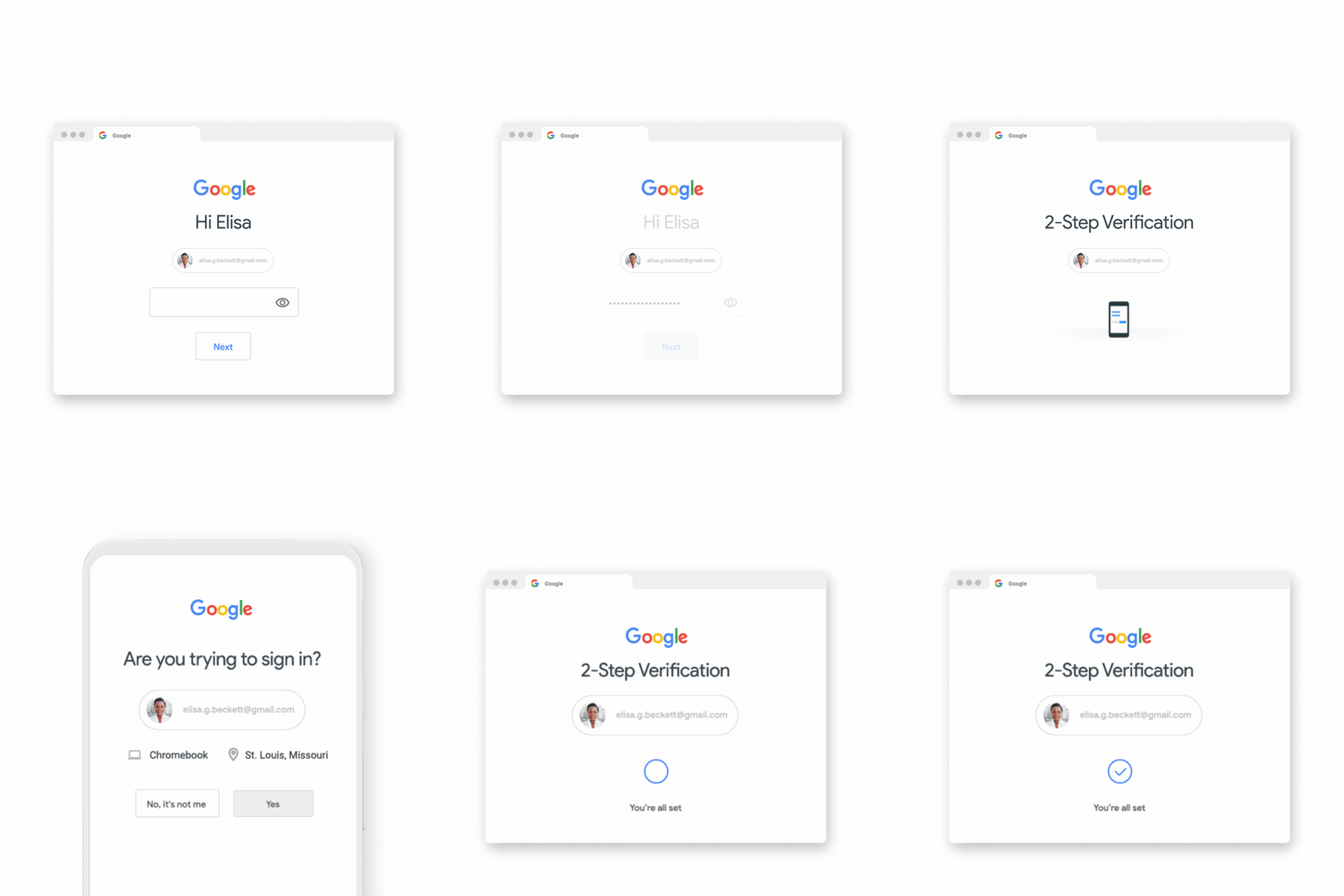
Am I the only person who loathes this form of 2FA? I have this on my eBay account and it never works. I click the "Approve" button, and it fails to send so I can't login. I would prefer to just use my 2FA TOTP app, which has yet to fail me!
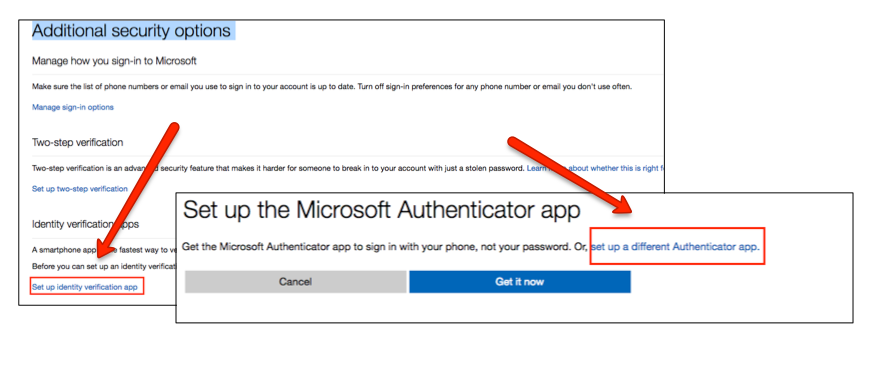
My work has the same sort of setup, they expect you to install the "Microsoft Authenticator" app (no TOTP supported) and click approve in that. But how have we increased safety when my Team/Outlook phone app requests that I click "approve" on a different app? I'm basically alt-tab'ing and clicking a different button, not really an improvement. It should be on a separate device, or something out of Microsoft's control so they can't screw it up.
Worse still is SMS 2FA, which appears to just be an analytics technique rather than a security feature. As we know, a phone number is only as secure as a carrier's most-tired employee.
>Am I the only person who loathes this form of 2FA?
Not in the slightest. I tried to configure TOTP-only and Google effectively tells me to go fuck myself, because they apparently know how to secure my account better than I do.
I've found that if you move away from Gmail (and there are much better providers around), a Google account doesn't contain much. Turn off your history and someone compromising your account can do... what? Search for things you'd like? View your YouTube favorites? Meh.
Agreed. I have moved off of Gmail (went to fastmail, very happy) and I also removed my other services off of my gmail account for logins. My google account has my calendar and youtube and that’s it.
Me too! However, my fastmail app is slow on my phone (a Nokia 6.1), compared to the Gmail app which, while not buttery smooth, is still faster than Fastmail...
And the Gmail app refuses to allow IMAP accounts to archive emails, so that's pointless...
The hardest thing for me to replace so far has been Google Maps. I use a handful of OSM map apps, but none of them come close to the local business lookups of Google, which I need quite often.
You don't need an account for that yet. I've been using Maps in "incognito mode" for 6 months, but I wouldn't be surprised if they're still using Maps to collect data about me.
I was in that same boat, which is why I decided to migrate off gmail and move to a paid provider. One day I just woke up an realized I had to much important shit tied to my email to not be a customer. Paid services to replace google are surprisingly affordable. And best yet, if there is ever an issue, there is also a number I can call. Totally recommend migrating away.
Assuming reasonable levels of competence on the part of the service, which scenario seems more likely for the average user:
1.) Some unexpected glitch occurs (could be the user's fault or could be the company's), and the user's ability to access the service is temporarily interrupted until a human is able to investigate and resolve the problem.
2.) The user is specifically targeted by a malicious actor performing SIM swap and/or social engineering attack.
I'm not really a gambler, but if I'm forced to guess, I'd say #1.
The issue with moving away from Gmail is that some sites don't allow you to change your email address. I can only imagine the chaos that will be when Google decides to kill Gmail.
Not OP. While I've personally not yet fully migrated out of Google, I found Synching and Resilio Sync quite useful to transparently backup photos to my own computer. And to prevent losses, I have a Backblaze subscription.
While I do have a VPS, it only has like 20GB, so I've yet to find an affordable and easy photo sharing solution.
You can set up PhotoStructure to build smaller (4k, 1080p, whatever you want) previews on your home server, and rsync just the previews dir and DB periodically up to your VPS. A couple of my beta users do this. (I'm the author, btw).
As always in this threads I hear people talking about SyncThing etc (and i have it and it's neat) but that works for Android. How do you exit the iCloud land in an easy and reliable way? There is no SyncThing for iOS.
Yet no company wants more personal information from you than this one. They want everything. Even when they have so much, they are going to great lengths to get more.
They are not in the security business, they are in the online ad sales business.
Windows with a Yubikey is like this, most particularly in Edge. It'll accept your key once but you'll have trouble using it again. It'll tell you that it doesn't recognise the key.
Some bullshit with Windows Hello, I'm sure, since using a hardware key in the browser triggers it.
I would rather use FIDO2, which is an open, decentralized standard that's both super secure and convenient. Why is nobody supporting that? That way we don't even need to remember usernames, let alone passwords.
I was really hoping that would catch on when I got my first yubikey some years ago. So far it seems that basically no one is using it. Which really sucks because it's so much more secure. Makes it impossible to accidentally send credentials to the wrong site.
I've yet to run across one browser / operating system combination where WebAuthn is implemented well. Stuff like assertion interface not showing up if you have two authenticators present. Browser and OS vendors should really fix their shit before any mass WebAuthn adaptation happens.
If you have a Windows 10 computer with Windows Hello enabled, Windows 10 will ALWAYS assume you want to use a platform authenticator if the website doesn't specify whether to register a platform or a cross-platform authenticator.
If you have both Windows Hello enabled and a Yubikey inserted into your computer and you start the registration, Windows 10 will always bring up the Windows Hello dialog, asking you to perform a biometric verification. In my case, this will be a fingerprint reading. Your Yubikey won't be in any way active and the option to use your Yubikey won't be visible even if you click "More choices".
What you actually need to do is to press the "Cancel" button on the Windows Hello dialog. If you press Cancel, only then are you prompted to register a security key. And if the registration was started accidentally, you need to press "Cancel" both on the Windows Hello dialog and on the security key dialog.
It's just downright stupid UX. You basically need to teach the users to "start the registration and then immediately cancel it" if they want to use a Yubikey on a Windows Hello machine. If the website doesn't specify "platform" or "cross-platform" preference during registration and the user is using Chrome on macOS with Touch ID, Chrome will just ask if you want to use Touch ID or use a security key.
If the website specifies a preference for cross-platform authenticators, or there's no Windows Hello set up on the machine, then Windows will actually show the security key registration dialog without any need to click "Cancel".
There's also the issue that WebAuthn resident keys can only be managed through the clunky command-line interface. At least I haven't found a way to manage resident keys in another manner. But the clunky command-line interface is actually among the best management options - other browsers provide no management for resident keys.
I've actually considered writing a blog post griping about how stupid the experience with WebAuthn is. Chrome, Firefox, Safari, Edge, Windows, macOS, iOS. I don't think there's been any combination there where something hasn't annoyed me.
The cancel issue you described is no longer present in the current version of win10.
The unfortunate fact is nobody except us geeks uses Yubikeys. 99% of users prefer platform keys. So it's not hard to understand why software defaults to it.
> But how have we increased safety when my Team/Outlook phone app requests that I click "approve" on a different app?
By ensuring that whoever signs into the account has at least two distinct factors: the password and the trusted phone with the authenticator app. One thing you know, one thing you have. Perfect. (Depending on your phone's settings around biometric unlock, it might be even the trifecta: one thing you know, one thing you have, and one thing you are).
Let's imagine we implemented your suggestion of requiring the login to be on a different device than the authenticator app. What threat model does this protect against? An attacker who has your password and the unlocked phone will just sign in from a different device with the password, and then use the authenticator app from the phone. The only people you're protected against are those who do not have any access to another device than the stolen phone.
GP is saying they're using an authenticator running on the computer they're logging in on (they alt-tab to it from the browser). So they have two factors in the sense of "something you know" vs. "something you have" but in this case the something they have is the same device.
I have trouble with the MS signin for work. Looks like blocking third party cookies (which safari seems to do) makes this nearly impossible (or incredibly inconvenient) to use.
The something you know these days is just stored in your password manager, protected by your phone’s passcode most likely, so it all ends up being “something you have”.
I'm with you. I also dislike that I can't even turn this form of 2FA off for my Google account. If I have 2FA enabled, this is required to be one of the methods. The only way to get rid of it is to sign out of my Google account on my phone.
Agree. And worse I sometimes just don’t get the pop ups.
It’s literally the only reason I’m considering dumping the Gmail app. If you use an app password and the standards based mail client like imap or pop, this isn’t forced on you.
Ive also seen an increase in google flagging my accounts for some reason and I have to go and reclaim/verify them using the recovery accounts.
Incidentally I was just on the Ebay website and looking through the settings since it's been a while. I thought I'd activate 2FA, but when I saw that they only offer SMS and via their app, I discarded the idea.
> Am I the only person who loathes this form of 2FA?
Apparently not, but it's always worked for me. Two things, though: 1) sites should support multiple methods of 2FA. I don't understand why many only let you have one. If I drop my phone in the toilet, I want to have a FIDO token enrolled as backup. 2) some of these implementations, like Google's, are proprietary. I want something universal and standards-based so we're not dependent on a different app for every service we use.
> But how have we increased safety when my Team/Outlook phone app requests that I click "approve" on a different app? I'm basically alt-tab'ing and clicking a different button, not really an improvement. It should be on a separate device, or something out of Microsoft's control so they can't screw it up.
You're correct, and knowing only what you've told me, I would argue this solution was implemented incorrectly.
Every time I log in, ebay bugs me to confirm my phone number "for security purposes". I say no, because I know the next step is harassing me with text messages every time I want to log in (like Google, etc). Passwords work for many of us. I generate them with pwgen(1), store them in a text file on encfs, and cache them in browsers. If my actual desktop computer ever got pwnt, I would have much bigger problems than a Gmail account or even online banking. This might not match the security model of people who reuse passwords across sites, and/or log into accounts on public computers (derp), but it is the original security model of the web and it's extremely frustrating that companies are attempting to destroy it in favor of some magic (read: unpredictable) new system that continually gets in your way.
eBay would not flip on two factor without you knowing. Likely it is to alert you of a new device accessing your account and possibly part of a password reset flow.
It’s a good point though — how munch more secure is two factor if you have an unguessable password locked away in a password manager. Your single point of failure is security of your computer.
But this is exactly what Google did to me - rejected using my perfectly good password in favor of "two factor" authentication consisting of my recovery email and some saved browser session (which no longer exists as I periodically wipe browser sessions). Plus the countless number of websites (usually online banking) that abuse your phone/email to send you a code for every login, having been spoiled by the mobile-surveillance environment. So I really can't trust that eBay wouldn't start doing something similar.
And yeah I do get the idea that if my password is actually compromised and hostilely changed, I'm going to be looking at the company for some sort of reset. But the right way of doing this is a higher friction process that could require phone engagement, in person notarization, etc. It's certainly not to make this reset process part of the every day login experience based on this mistaken idea that passwords are always insecure.
Yes, this is a good point. With the Authenticator app on the phone and unguessable passwords (stored in a password manager on the phone), security all comes down to your Phone’s passcode. Know that, and you have complete access to all accounts.
Apple and Google should just short circuit this and directly be an Authenticator as well as manage the long lived token (the password) behind the scenes, which will eliminate the alt-tab dance.
You can use regular TOTP with Microsoft. You have to click some box during setup that will show you a QR Code. I can't remember what it said, but I did it a few months ago after a tip here on HN.
I’m not crazy about these “consult your phone to log in” things. There’s just so many more moving parts. Sometimes the push notification doesn’t make it through. Other times the acknowledgment from the phone doesn’t make it back. Occasionally my phone is doing updates when I urgently need to log in.
I’d love for the “something you have” to be “my laptop.” It has a TPM; we can do this securely. Something like the MBP’s Touch Bar where there is a separate integrated physical device with a screen that can make security prompts is ideal.
I had a particularly hard time recently due to this when my phone broke and I couldn't replace it for a week or so. It all got figured out in the end, but not being able to access my Google account and all that entails was more of a problem than I expected.
That's why I have the set of printable backup codes in my wallet. One time I forgot my phone, but I had my wallet and was able to log in to my Google account.
I keep Authy installed on my tablet for exactly this reason, in case I lose my phone I still have a backup device for 2FA. Won't help for the SMS 2FA for the sites I'm forced to use that on, but at least Authy lets me get to the important ones.
A well-designed MFA system has multiple fall backs available. Google's has options to fall back to sending an SMS (not the highest level of security, but security is always a trade-off), so if you're phone's broken you can move the SIM to another one. Or a phone call to a pre-registered landline that will read out a code to you. As well as the paper/printable emergency codes.
That said, there's always going to be compromises and annoyances - I've been using MFA for 10+ years, and occasionally something glitches out, but other things (e.g. basic password systems) also sometimes glitch out, and having an account compromised is much, much worse than a minute or two of mild annoyance.
Not everyone has a SIM to begin with. Or it is lost with the phone.
Anything that has a single or dual point of failure is dead on arrival. Too bad you will realize only after you are locked out of all your digital life.
For what it's worth, google's MFA setup is the best of any I've used. You can (and should) setup a variety of second factors on your google account so that if one of them fails for some reason you've got other options. Between backup codes, TOTP, pixel phone verification and multiple FIDO keys there's plenty of options.
This compares very favourably to, say, AWS where you can only have a single second factor and the recommended(!) way of protecting against loss of a second factor is to have multiple accounts with different second factors registered to each of them.
Go to some google service > profile menu dropdown in the top right > manage your google account > security > signing in to google > security > 2 step verification.
You can then 'add more second steps to verify it's you' including an option for an authenticator app (i.e. totp). Also worth generating some backup codes while you're at it.
They have it already in WebAuthn in a completely siloed way. That is, they only implement hardware token support and if you want software tokens, they will make your life painful.
Desktop (i.e. non-portable) WebAuthn authenticators are good for things like transactional authorization (e.g. confirm a payment on PayPal), but not especially useful for authentication: if you already have your WebAuthn secrets on your browser (or OS), you probably also have your authn cookies, too!
I'm glossing over a few things (e.g. WebAuthn credentials can be stored in secure hardware, so can be more secure than cookies), but in general, WebAuthn secrets stored in a desktop TPM, while valuable in certain applications, aren't alone a very meaningful step toward getting rid of passwords—since passwords are primarily used for authenticating on new (never-before-used) endpoints.
A slightly degenerate case is one where you use passwords to sign into your (say) MacBook, but Apple syncs the WebAuthn credentials via iCloud so you don't need a password on any other services. Which, like, if you're gonna do this—why not just use Apple's password manager and sync passwords? :)
I would never want my laptop to be my authentication device for my personal life. I am away from home when I need to log in to things. Even if I'm at home, I am not sitting at my desk when I need to log in.
The worst way is how my bank is currently doing it, they require SMS authentification but do not allow two phones at the same time, and to switch it on you have to sign something and wait for a letter by snail mail.
Now I'm stuck with a decade old phone just to confirm my online transactions, and if it breaks I'm out of luck. The alternative would be to not have working online banking for one or two weeks, which I cannot afford at the moment (thanks to Covid).
Am I the only one who doesn’t want a future without passwords? There are problems with them, of course, but all the alternatives also have serious usability/security issues. And just when we’re starting to get wider 2FA adoption, companies want to get rid of one of the factors. So we’re back to one factor that’s ultimately secured by a device password/passcode anyway. Plus if/when you’re not able to access the device, it’s much more painful to deal with. Not sure we’re really making that much progress.
Personally I think the basic building blocks of the password manager workflow is pretty damn close to perfect. Maybe the contemporary password manager could be refined further, but I do like the building blocks:
1. There is an encrypted blob which contains distinct authentication tokens/passwords/whatever for every website/service I have an account at. This blob can be moved around, synced and updated however I like, with zero concern about who has a copy of it.
2. I decrypt this blob locally on device, using a combination of multiple factors such as what I know (a passphrase) and what I have (e.g. a copy of a static but un-guessable and un-rememberable account key, which is copied to all my devices, potentially stored at rest inside a secure enclave).
3. The decrypted blob then authenticates me on services using data which is entirely random and arbitrary.
I could only imagine how much more perfect this arrangement could be with total industry uniformity. Imagine if a common, uniform password manager API was integrated into computers from the earliest days, and all browsers integrating this system service from the very beginning of the Web. Every website could have been built be built around this workflow, not to mention every binary application on desktops and smartphones.
In your system, doesn’t security still just come down to the passcode of your phone and physical access to it? With access to your phone, the attacker will have access to your email, which will likely allow them to reset the password on any account.
This is true for any phone where you are persistently signed into your email client.
The solution is a competent hardware security layer and a reasonably strong passcode, such as offered on recent models of iPhone. This is sufficient for normal people to thwart opportunistic attacks.
Of course if your adversary is a Government or a corporation that has root permission on your device, you would obviously take a different security posture.
This is because the security of "2FA" isn't really from the fact that there are two factors, but that one of the factors is kinda just ok, and the other factor is ideal. A password on top of a proper 2FA method doesn't actually add any security to the typical login flow.
> So we’re back to one factor that’s ultimately secured by a device password/passcode anyway.
Unsure of exactly what you mean here - in what way is something like a yubikey secured via a password? Also, even if that were the case, changing the scope of passwords is important in and of itself.
> Plus if/when you’re not able to access the device, it’s much more painful to deal with.
Agreed, this is the big problem to solve - essentially this is just a subset of the "recovery" problem. It's one place where passwords may still fit in, though in a different role.
Ultimately, verifying identity at scale is just extremely difficult, and there will never be a perfect solution to recovery, but I think that we can mitigate that quite well with things like:
a) Phones as 2FA devices/ recovery devices
b) Multiple devices (ie: if we can reduce the cost of hardware tokens by an order of magnitude it becomes viable to buy 2+ for many more people)
c) Slower recovery methods that involve leveraging multiple identity methods - things like validating a government issued ID, mailing address, etc.
> in what way is something like a yubikey secured via a password?
It isn't, which makes me confused about how it is supposed to be more secure. If I lose my keys with a physical security key attached, not only do I now have to worry about somebody breaking into my house, but all of my online/digital properties as well (assuming passwords become a thing of the past). If they have my phone which has Touch/Face ID enabled, that poses a much more significant challenge to an attacker (and can maybe be mitigated if I can remote wipe the device in time).
Well, there is a pin on a yubikey[0], but I just meant I don't think it's totally necessary, and I'm not sure exactly when it's required.
> but all of my online/digital properties as well (assuming passwords become a thing of the past)
For sure, and that's definitely not a threat to take lightly - another thing to consider would be when the attacker is someone who inherently has physical access to you (say an abusive partner, parent, etc).
You're totally right that a password can, at least to some extent, help in these situations. Like I said, I still see a use case for the password, it's just that the scope would change - like how password managers only require you to remember one single password, and that password is essentially only used in one place. This really reduces the risk of phishing.
> If they have my phone which has Touch/Face ID enabled, that poses a much more significant challenge to an attacker (and can maybe be mitigated if I can remote wipe the device in time).
Yeah, agreed - I think biometrics can definitely be a key part of how we get to a password-less world. There's other stuff too, like if the attacker has your key, but they're logging in from a new device, maybe it asks for some other verification like a biometric, or even a password / pin - but now the password again is taking a very different, much more limited role.
All I'm really saying is that the current way things work is pretty bad. Passwords get forgotten, guessed, stolen, reused, phished, etc. Using a device solves those problems really well, and while it does have its caveats, I think the caveats are largely addressable.
> Am I the only one who doesn’t want a future without passwords?
As much of a Science Fiction fan I am with "iris logins" and similar, I am also a retro-futurist who appreciates things like punch-number security for secured doors.
I mislike this current 2FA path of security for several reasons, the least of which is what if the email never comes or I don't have a cell phone (let alone a smartphone)? I'm screwed.
Passwords, passcodes, number pads ... seems to be quite more Human than all of this "prove yourself in the name of security theatre" these days.
It's unchangeable and externally facing. The only truly secure enclave is the things in my head, and they have the benefit of being changeable if compromised, and I can make a positive distinction of value if under duress.
"We were compromised. Rotate your passwords, chop off your finger and change your face."
[End snark]
Biometric measurements are fuzzy, by their nature. This in turn means that for every stored biometric identifier, there is a whole range of inputs / input signals that will match. On top of that, the measurement devices are on untrusted systems.
If you can compromise the device and extract the signal sent from the sensor, you should have a near universal replay payload. Right now that is still an espionage realm threat, but as these methods become more universal, mass attacks against large populations become more and more appealing.
Archives of valid (username, password) tuples are already sold on underground markets. It's not much of a stretch to predict that (username, biometric sensor dump) archives will eventually become a commodity too.
>If you can compromise the device and extract the signal sent from the sensor, you should have a near universal replay payload. Right now that is still an espionage realm threat, but as these methods become more universal, mass attacks against large populations become more and more appealing.
If the manufacturers had a sense of security, they would make the sensor into a hard-wired device that takes an auxiliary value as input and combines the input with a fuzzy extractor to provide a unique key per auxiliary value in such a way that neither the value nor the biometric can be extracted from the key.
No only that anytime you use Google's 2fa, you let them know where you are and what you are doing. Privacy is a commodity we have willingly and unwillingly given up.
They have a range of second factor options, including simple SMS to your phone, the use of their authenticator app (which presumably uses TOTP ([1]), and which could therefore be replaced with compatible alternatives, e.g., LastPass's authenticator app), or USB keys containing a second factor (possibly TOTP-based). [2] has an overview of Google's TOTP implementation.
They all do the same basic thing: userid and password let them know who you claim to be, which they validate using one of the second factors listed above.
Yes. Authentication via shared secret (aka password) is actually ideal from most use case angles.
Sure it's broken if that password is "password123". And remembering 20+ characters (minimum to be good) isn't practical.
But all that is solved problem with password managers. Generate very long truly random & unique passwords which are never reused and that is actually very strong.
If one of the factors is extremely secure (pushes, smartcard FIDO2, yubikey) then I think it is reasonable for the other factor to just be a PIN instead of a password.
My sister was divorced and had to split her phone off from the shared plan. Not wanting to bother her ex, she just changed her number and got a new phone. A week or so later she tried to sign into Amazon:
She knew the password but they wanted the 2 factor on her registered device. That device was traded in.
That’s ok, the backup plan was to send a code to your phone number on record… of course this fails as well.
It can get very aggravating when 2FA goes the wrong way and people don’t believe you are who you say you are. Assuming that users will always have the same device or the same phone number is an obvious mistake.
Amazon is a pretty bad example because it does give you backup codes to override 2SV. But for most properly implemented sites, if your sister had the backup codes, that issue shouldn't happen.
Google has chosen poorly in forcing Google Prompts on all signed-in phones and tablets when 2-step verification is turned on. It nullifies the extra security of a hardware key, turning all of your phones and tablets into weaker second factors, whether you want it or not.
To disable Google Prompts and just use your YubiKey's U2F, you could enroll in Google's Advanced Protection Program. But then your TOTP and backup codes would stop working, as would any third-party apps that need access to data in your Google account.
The YubiKey, by the way, is a great hardware TOTP key, in addition to being a FIDO U2F key. TOTP has an advantage over U2F in that you can keep backup copies of the TOTP secrets. Of course TOTP is less secure because it is phishable, but U2F is a real pain because you can't make backup copies of the key.
> but U2F is a real pain because you can't make backup copies of the key.
The backup is to have multiple U2F keys. I have over 10 U2F keys. Most (but not all) providers allow you to register multiple U2F keys.
Amazon AWS for some foolish reason (in my opinion) is one of those outliers which only allows one U2F keys to be registered. I've read people's reasoning on why that is and none of it makes sense to me.
And what a pain it is to keep multiple keys registered on all of your services. At least one of those keys should be stored off-site, which means making trips to the off-site location to swap that key, bring it home, and get it registered also. Do that again when you want to register a new service.
Can you walk me through your workflow with these? Are some stored offsite? Do you have to gather all your keys together when you are signing up for a new service with U2F support?
I also have one in my work-laptop but it is only registered for work related sites. I also register some of the previously mentioned ones for my work related sites as a backup.
The basic idea is to have two U2F devices with with the same device_secret but one of the devices (the backup) is pre-programmed to add a large offset to the so called counter value. Upon login the service must check the counter value and ensure that the received value is greater than the one it's seen previously. If you happen to lose the first key, you can use the second key to log into all of the affected online services and upon doing so, the service would accept the new larger counter value and thereby invalidate the lost key.
Sure, not being clonable is a security feature, but it's a huge pain to keep multiple keys registered on all of your services.
For real backup resiliency, you should have at least 3 keys, one of which you keep off-site. Presumably you keep one at home and one with you. Want to sign up for a new service? I hope you're at home where you can access two of your keys to register them. Then sometime later you need to go to your off-site location to swap that key, bring it home, and get it registered also. Do that periodically so all of your services are on all 3 keys.
Unclonable hardware keys work well enough when it's for a corporate service. Lose the key? Just visit IT and have them give you a new one or overnight it. But unclonable hardware keys are a huge pain when used personally with multiple services.
TOTP secrets, while less secure, are much easier to manage. You can write them down, store them on a USB stick, or store them in an online account. You can send them in a message or even read them over the phone. Ultimately the average user is more concerned about losing access to their account than being attacked by a nation state.
Hardware key is offline device, phones are online devices. While phones might have arguably quite good security, their attack surface is many times bigger than offline device that you keep with you. There is almost no way for remote attacker to gain access to offline device (though local attacker will likely have easier time getting that than phone). With phone it comes more down to cost/luck (pay/develop 0days until you have full chain).
If you don't have a google-enabled android device (as I don't), and you've registered your Yubikey with google (as I have), they won't use the Yubikey they will SMS you instead.
Seems like they prefer google prompt, then SMS, then the actually secure stuff.
I just went to the bother to confirm that, exactly as I expected, Google just asks me for my Security Key when I sign in. This is what their UI says they will do, and sure enough it is in fact what they actually do.
So whatever you're seeing is not in fact some sort of Google policy to prefer insecure SMS.
The biggest threat is not the password but the recovery email being hacked or google locking out your account if you supply a phone but are unable to verify it after changing your location. That will lock your account. As always google always misdiagnoses the problem which they themselves helped create.
> Soon we’ll start automatically enrolling users in 2SV if their accounts are appropriately configured
I get that this makes accounts more secure, but I'm more worried about accidentally getting locked out because my phone isn't charged/nearby/working than getting phished. I really hate it when sites take your ability to choose away, even though I understand why they do it.
I wish the EU would regulate that sites must implement U2F (with proper support for multiple keys) so at least you don't have to deal with 100 different (and usually annoying) 2FA methods (often the insecure SMS 2FA).
So when my phone battery is dead and I try to log into my computer to tell everyone I’m going to be late, I can’t message them because my phone battery is dead. Awesome.
This was my thought too. How many people are going to be auto-enrolled then get locked out because they dropped their phone in a lake. Either this is going to be a huge issue or they are going to provide ways to reset your second factor. In which case is it really 2FA?
This caught my eye as well! I was expecting something about authenticating without passwords only to discover a post about...Google's password manager.
* Google is marginally increasing security by turning on 2FA automatically for some accounts
* Google's password manager has a new "import" feature
Based on the title, I expected maybe some radical new developments in WebAuthn or similar password-replacement technology, not incremental improvements to Google's products that benefit only Google users.
The thing I like about the password is that it does not involve any additional technology dependencies.
GitHub is going down this road, too, announcing that they will soon disallow password-based auth on git operations.
I'm not sure if I will keep using it after that, because having to log into the website from every workstation, some of which may not even have a browser "good enough" for github.com, is more extra work than I'm willing to attend to.
They do allow you to generate OAuth codes with scoped access , which effectively acts exactly like passwords just giving more control to you and ensuring your account is safe.
I don’t think GitHub’s implementation is ill intentioned at all,
When compared to Google’s where it’s now effectively forcing me to keep using the gmail app
Because of these prompts
In a "future without passwords" every signle web site will use their own app for 2FA, forcing you to install all of them. It should be possible to have one common open standard for "push" 2FA apps and let consumer chose which app to use. Like we have now with Google Authenticator, andOTP, DuoMobile, etc, but with unified "push" functionality.
I've just been to check my 2-Step Verification settings on a Google account to see if I could remove SMS as a 2nd factor yet. I've been wanting to remove it for a long time as I don't trust it.
I thought I'd try adding a 'Security Key'. There was an option named 'Google' so I chose it to see what it meant.
I was immediately presented with:
    Success! Security key added

    Your Google security key was added to your account.

    When you sign in with 2-Step Verification, you'll use your
    password and your Google.

    Make sure that Bluetooth and Location are on.
    When you're signing in, Bluetooth & Location are needed to
    check that your devices are near each other.

    Bluetooth pairing isn't required.

    Works only on Chrome
    Built-in security keys currently only work on Chrome
So I'll use my password and my ... "Google"?
I'm guessing this is related to the Google phone app, but if I go to add another security key I can see 'Google' is now disabled and it says next to it 'Last seen 8 February' ... but I've opened the Google app on my phone more recently than that, because I've used it for 2FA for this Google account before!
I don't understand "Works only on Chrome". Is this saying I can log into Google on Chrome (desktop) by using the Google app on my phone?
I've got 'Authenticator app' set up already (not using Google Authenticator - you can use the code it provides to add to Authy or 1Password or whatever you like).
I also have backup codes as a paper copy ... so I think I might now be safe to remove 'Voice or text message' as a backup option, but I'm still wary of doing so.
I want a future without passwords, but that future gives me the choice of third parties to host my passwords. I prefer 1Password, some people like iCloud, while others may prefer a Microsoft solution.
Passwords suck and we need a per-site password policy that can act like an API. Kind of like a Robots.txt, to declare, "This site needs 8-20 characters, 1 symbol and the URL's for login, reset and forgot password are these URI's."
This is already built into all browser and works great, as client-side SSL certificates. Nobody uses it though because you can't trust users to manage their private keys properly.
I built something like this about 5 yrs ago, applied to YC and they said nope. This is the future, password sucks. The only issue with this is there's still a password in the background and you still have to register. My solution was no signup forms, no passwords. You click one button to sign up to a site, you tap your phone to sign in. This kinda shouldn't belong with Google tho, Google, Facebook wants to use this to keep you to lock you in to their ecosystem. A 3rd party that does only this with absolutely no lock-in is ideal.
I don't carry around my smartphone, just a nokia. I hate this approach with a passion. Please just send me a text message, or an email to confirm my login as a second factor to my password, and then trust the IP on user decision. Please don't make me use a smartphone app.
SMS 2FA is incredibly insecure. It has a huge attack surface: a stolen SIM card, a MITM attack (SMS is not encrypted, and devices like the Stingray that pretend to be cell towers to gather data are already in widespread use), or good old social engineering to convince a cell provider service rep to port out your number or issue a new SIM card.
I hear this all the time, but you’re sooo unlikely to be important enough for this to actually matter. And even if it did happen, the attacker would still need your password (and sometimes your phone number) first.
I've seen several sites that don't have permanent password at all. You just tell them your email/phone no, and they send you the temporary password, which expires after the short time. Looks a bit unusual, but the security is not much different from any site that has password recovery by email/SMS - if somebody gets control over your email, you're toast, otherwise you're ok. I wonder why more sites don't do this...
Most apps are not significant enough that people will go through the pain of checking their emails to get the new temporary password
Also , a lot of email clients still use STARTTLS while communicating with mail servers to fetch emails , which means a MiTM can reduce that connection to plain text (isp’s have been caught doing this before to read people’s emails) and then steal your password.
A site that enforces a rule like that must guarantee that its user’s email server only allows TLS only handshakes on client side (which is difficult if not impossible to do 100% of the time)
So even if the idea is great , due to the state email is in , it’s pretty risky and unsafe to MiTM attacks and network inspection.
Letting Google manage my passwords to Google. Thanks but no thanks. Great fun awaits those who would fall for this and Google later decides to cancel their account for whatever reason their AI will have managed to concoct by then.
I use 1Password and it offers dedicated 2FA fields where it generates the tokens for you.
It might go against the second factor in 2FA, since the password and token comes from the same source, but it protects me against potential data leaks where my password might be included.
But for me, the biggest benefit is having to remember just one password to unlock 1Password which then lets you copy or autofill your passwords. This is why I even don’t know my actual password for such sites since they are auto generated arbitrarily characters.
Somewhat controversial opinion: The biggest problem with passwords is that users select them, and users are stupid. We would get 95% of the benefit of 2FA (For forms of 2FA that aren't yubikeys, as yubikeys have benefits related to phising, but nobody uses them so its moot) if websites chose passwords for users instead of the user choosing the password.
In particular, the only two threats that 2FA as widely implemented on websites protect against are password reuse, and weak passwords. Both are the results of users choosing stupid passwords.
> The biggest problem with passwords is that users select them, and users are stupid.
I really hope you don't work with users or are doing anything that affects them. Users are not stupid, they maybe lack understand or are lazy and things are inconvenient. But the world is easier if you can just pass of your responsibility to the ominous "dumb user", isn't it?
I meant no disrespect to users as a group. Nonetheless its clear that we can't get >99.5% of ùsers to implement this security control properly, and that makes it a bad security control. And to be clear, its my belief that if someone implements a security control that constantly fails due to misuse, the party at fault is the implementor, not the user. Whether that's because users don't understand or just that their interests/incentives are disaligned, doesn't really matter.
I agree. We can improve it so that others don't have to think about it and it actually solves their problem. Right now we pretty much just move the responsibility to the user.
2FA adds more value than that - it’s meant to be about “something you know and something you have” (in theory, physically). That way, even if your password is compromised three something like a data breach, you’re still protected.
If the server in question is data breached, than they'll steal the 2FA secret. If the user's cell phone is breached, they will steal both the 2fa token and the password (or just the session cookie). Well what you say is true in theory, its not true in practise of how 2FA is commonly implemented.
As someone whose main project surrounds passwords, I could appreciate a future without passwords, because I consider most existing solutions to be quite poor.
However, this feels more like having your sheep be herded by a fox...
Many here have already mentioned great points retorting this, so I won't beat a dead horse.
I will take the selfish opportunity to mention what my solution is that I'm working on: https://app.SrsPass.com
There's some rudimentary docs with a spec outline for those interested. But to sum it up, I share the same fears as others here of one device being some ultimate honey pot, or even worse, losing everything I have due to corruption or losing a/all devices where your pass vaults are when it comes to traditional managers. (Mind you, this coming from someone that runs RAID-Z3 NAS in multiple offsites).
Basically to keep it simple, I required the following aspects
- Available-source or Open-source (duh)
- Accessible on just about any device with a cpu, arm/x86 etc
- Vaultless & as stateless as possible
- No cloud, works completely offline
- Uses modern cryptography with sufficiently strong parameters
- Requires only one password to memorize
- Has uncrackable generated passwords (aka not feasible to crack in a long time period such as with 128 bits of entropy).
I believe SrsPass to meet all those aspects already. That is not to say that there aren't more features being worked on (the workboard is essentially public), however, I think you'd be hard pressed to find a more secure (when you build & run yourself) and accessible password manager than it.
There already is a future without passwords, it's WebAuthn.
The key element that didn't make your list is phishing. The next threat to Joe Average once he isn't reusing a crap password is phishing. Joe goes to a site which he thinks is the right place but it isn't, it's actually run by bad guys and then Joe gives them his credentials and helps them break into the real site Joe thought he was visiting.
Better passwords make no difference to that. Some types of password managers might slow Joe down a bit, as he needs to override a default presumption that this is the wrong site, but since the site has tricked Joe already this is very fragile. TOTP makes no difference, SMS of course makes no difference, and even the Google Auth tech AFAIK makes no difference.
But WebAuthn just stops this attack dead in its tracks.
It's a definite improvement, and good point indeed regarding phishing... just as your answer precludes, a whole different authentication mechanism is needed to avoid phishing, that is why unfortunately that couldn't make my list. However, it does protect your other accounts from getting breached if one is either phished or breached, which I considered to be good enough.
WebAuthn does have its own issues and complications, mainly with how to handle account recovery on a lost or corrupted device. Sure, you can have a replacement device, as likely me and you try and do for most things, however, this is too burdensome for many.
I think the biggest issue with any new spec like WebAuthn is vendor adoption. As is... many banks fail to have any 2FA, and those that do, give you the terrible choice of SMS 2FA. In addition, they have odd and archaic password requirements, such as only these symbols, and only up to 20 characters etc... If they have failed on rectifying these in the last 2 decades, I'm afraid how far in the future away something like WebAuthn is to being in realized use. Hence I made SrsPass as hopefully a solution to today's passwords problems, the ones I considered sanely resolvable.
This worries me a lot, just having a dynamic IP in a third world country is enough for Google to lock you out of the account even if you had typed your password correctly. I would never trust them with my access to other sites, one simple mistake of logging in with a different IP and will leave me locked out of all my accounts. In the name of security they ask you to associate a phone number to unlock the account even though that makes little sense since anyone with the password can then provide any number and steal the account.
Imagine being locked out of your house and bank accounts because your Google account got suspended. Maybe Google could introduced an account protection service for people worried about this happening - for a small annual fee of course - and unofficially turn it into racketeering.
Turning your $800 personal electronics into the moral equivalent of your physical keychain sounds like a good idea to technologists but it really, really isn’t. I’ve stolen your phone and also can access your bank accounts? Is it my birthday or what?
Watches are better this way because you don’t ever set them down (and they’re cheaper), but I suspect pickpockets have some things to say about those magnetic clasps.
Something in your wallet or with your keys would be best but then you can’t interact with it easily. Those little physical security tokens you’d put on your keychain were always a PITA.
They're only a PITA to me because my keychain isn't close by. Otherwise, I touch the phone to my keychain and that's it, I'm authenticated. What's painful about that?
I have one of those too on my work laptop, it's the most convenient thing ever. Not great if you have multiple computers, but it's great for a single one.
Then again, your Mac already has a TPM chip you can use.
> We’ve recently launched our new Password Import feature which allows people to easily upload up to 1,000 passwords at a time from various third party sites into our Password Manager (for free).
But the only way to manually add one password is to craft a custom CSV and upload it.
I feel like a baller remembering my complex ones for important sites and other mechanisms for simpler sites - it might take a few attempts sometimes but it feels good and I can do it anywhere without requiring additional forms of auth
I recently couldn't log in to my Google account on a new device (with a strong password) and the best I got from Google was an email how my login was blocked for security reasons without any indications on how I can say "hey, it was me".
Thank you Google, but I'd rather keep my password than you worry about my logins. You don't know how valuable this account is to me, and what kind of protections I want for it (it's an account I use solely to set up play store on my otherwise de-googled phones).
It looks like Google 2FA will support using a Yubikey or something like it, which in my mind is preferable to being required to use the Google mobile app.
> You'll enter your password [...] Then, a code will be sent to your phone via text, voice call, or our mobile app. Or, if you have a Security Key, you can insert it into your computer’s USB port.
Can my government simply issue me a card that looks like this, https://en.wikipedia.org/wiki/Estonian_identity_card, wherein one side has an official ID chip and the other side has a user-managed chip for solvent identity? Then, we can all stop mucking about with this or trying to hock something.
Won't this make my telephone service provider + phone a single point of failure?
Good thing it's not SUPER EASY to steal someone elses phone number, and also a good thing that modern smartphones basically NEVER break.
I think I'll just stick with my FinalKey which I can build extras of and which can store the encrypted database and backups offline.
Why don't web browsers have good password managers (like keepass or bitwarden) built in? It seems like a good solution would be to make random password generators more usabile than to throw out the baby with the bath water.
Judging youtubes (javascript) performance trend observed in the exact same browser build on the exact same hardware over a multi-year period, time to abandon ship fellas.
Yes but "got access to your chrome" is far far above the common threat level of most people. Physical access is a huge barrier. Sure, if you are being targeted than your phone or laptop being stolen while unlocked is a problem that you will need to address, however for 99% of the population this is a perfectly adequate level of security. Most importantly it is far better than the most common solution of using the same (maybe slightly modified) set of passwords everywhere.
TLDR: There is no actual talk or details of how the future without passwords would look or work.
It’s just a blog post about Google patting themselves on the back for how ‘awesome’ they are at keeping your passwords safe, and promoting some of their recent and upcoming tech to help manage passwords.
SQRL requires that web sites re-engineer their user authentication, the same cost they'd incur for implementing WebAuthn.
SQRL also requires users to get some additional software in order to work. Of course (this being Steve Gibson) that software is perpetually unfinished and buggy, and may not even be available for your browser (e.g. Safari) - but the next version will always be great...
But then unlike WebAuthn SQRL's anti-phishing protection is marginal, it might work, unless it doesn't work, and then it's your fault for not carefully matching things, a task machines are good at and humans are bad at.


After it took me a week to recover access to a GSuite account that I knew the password for (long, unique, stored in a password manager), that I could confirm access via the recovery email, and that had my phone number attached - but Google were insisting that I was a hacker, and Support-robots refused to help me or assign a human until I found the secret Konami Code that summoned a human.
That experience was exceedingly frustrating, and has killed the last ounce of trust I have for them to do anything for which I might rely on.
While they have neat technology, if you fall into one of the cracks, it's near impossible to get support.